The Complete Guide to AI Automation for Small Businesses
Small businesses rarely suffer from a shortage of work. They suffer from work that is repeated, delayed, copied between systems, and dependent on one person remembering the next step. A customer sends an email, an employee extracts the details, someone creates a CRM record, another person prepares a quote, and a manager follows up days later. Each task is manageable on its own. Together, they consume the time that should be spent serving customers and growing the business.
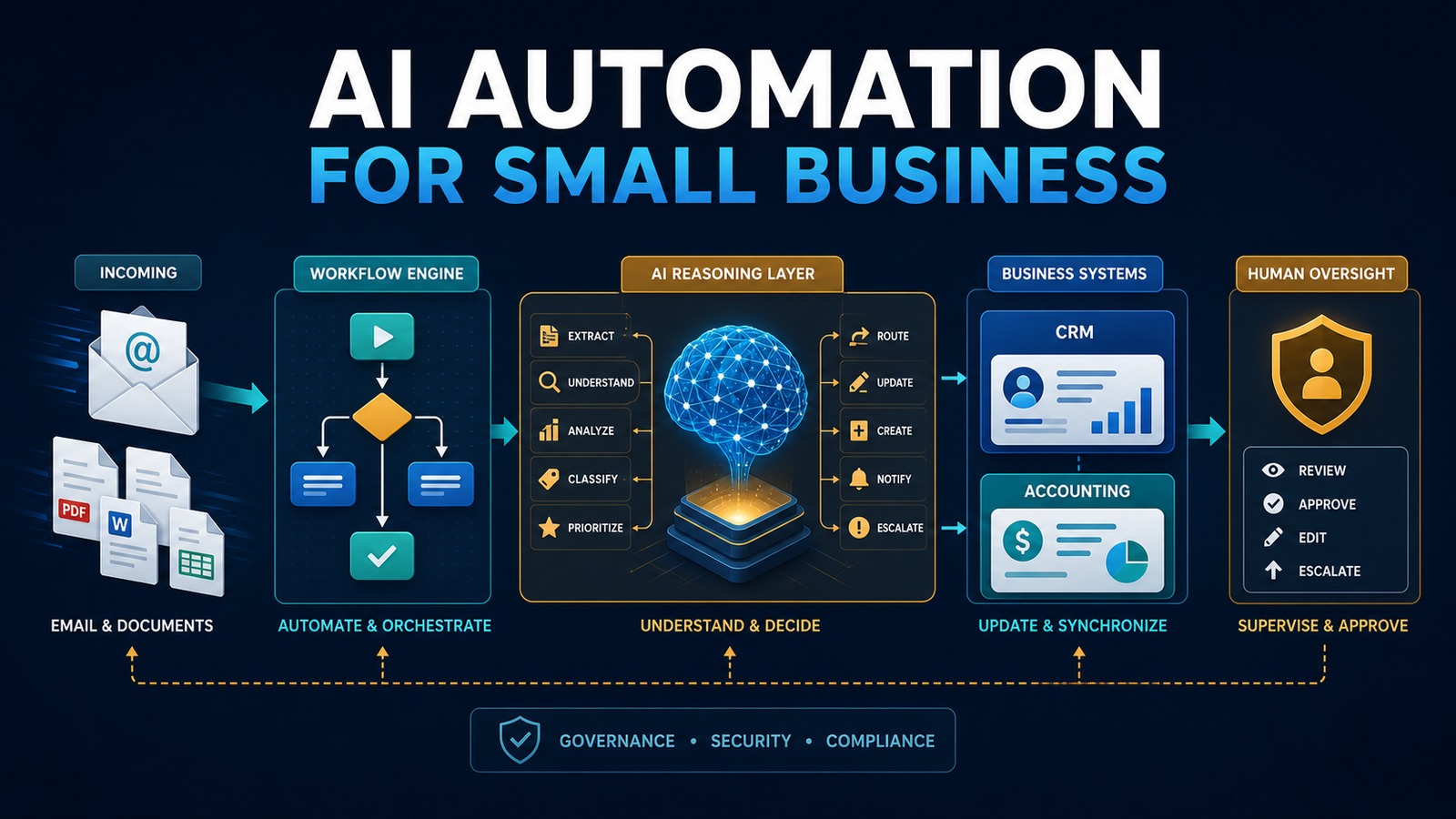
AI automation changes that operating model. It combines dependable workflow rules with artificial intelligence that can understand language, summarize documents, classify requests, extract information, and recommend an action. The result is not a robot replacing a company. It is a practical digital operations layer that moves information, prepares work, and asks a human for approval when judgment matters.
This guide explains how a small business can identify the right opportunities, design a secure architecture, select a technology stack, implement its first workflow, measure the return, and expand without creating an unmanageable collection of automations.
What AI automation means for a small business
Traditional automation follows explicit rules: when a form is submitted, create a record; when an invoice becomes overdue, send a reminder. AI adds the ability to work with information that is less structured. It can interpret the intent of an email, identify fields in a document, generate a draft response, match a request to a knowledge base, or decide which queue should receive a case.
The strongest systems use both approaches. Rules control predictable steps, while AI handles language and ambiguity. A workflow engine coordinates the process, business applications remain the systems of record, and people approve sensitive or high-impact actions.
For example, a service company might receive an inquiry by email. An automation can detect the message, extract the customer’s name, requested service, location, and urgency, then search for an existing contact in the CRM. It can create or update the opportunity, draft a response, assign the appropriate employee, and notify a manager when the request is unusually valuable or unclear. The employee begins with organized information instead of an empty screen.
Problem: invisible operational friction
Manual work is not always visible in financial reports. It appears as five minutes here, ten minutes there, and frequent interruptions throughout the day. Common examples include copying contact information, renaming and filing documents, preparing routine emails, checking whether a payment arrived, transferring data from a spreadsheet, requesting approval, and updating several applications with the same information.
These activities create four recurring problems:
- Delay: work waits in inboxes and personal task lists.
- Inconsistency: different employees follow different versions of the process.
- Error: repetitive copying introduces missing, duplicated, or incorrect data.
- Limited visibility: managers cannot easily see where a request is blocked or how long each step takes.
Hiring another person may increase capacity, but it does not correct a poorly designed workflow. The better first step is to make the process visible, remove unnecessary steps, and automate only the stable portions.
Why it matters
Speed and reliability shape the customer experience. A lead contacted in minutes receives a different impression from one contacted two days later. An accurate invoice gets paid more easily than one that requires correction. A service request with a complete history is resolved faster than one reconstructed from several inboxes.
Automation also protects employee attention. Every interruption has a switching cost. When software gathers the relevant information and presents a clear next action, employees can focus on judgment, relationships, creative work, and exceptions. This is especially valuable in a small business where one person may perform sales, operations, billing, and customer service duties in the same day.
The business impact should be measured in operational terms: shorter response time, fewer touches per transaction, fewer corrections, more consistent follow-up, improved conversion, reduced backlog, and greater capacity without proportional growth in administrative labor.
Solution: build a governed automation layer
A useful AI automation system has five layers. The first is the trigger: an email, form submission, uploaded document, CRM event, schedule, webhook, or database change. The second is orchestration, where a platform such as n8n applies rules, calls services, and records the outcome. The third is the AI layer, which performs a bounded task such as classification, extraction, summarization, or drafting. The fourth is the set of business systems such as vTiger, accounting software, email, document storage, or a PostgreSQL database. The fifth is human oversight.
Human oversight is not an admission that the system failed. It is a design control. Routine, reversible actions may run automatically. High-value quotes, financial changes, legal commitments, unusual customer messages, and low-confidence AI results should be reviewed. The workflow should make approval fast by showing the source, the proposed action, and the reason for escalation.
Architecture
A practical architecture looks like this:
Email / Form / Document ↓ n8n Workflow ↓ Validation and Security Rules ↓ OpenAI Classification / Extraction / Drafting ↓ Confidence and Policy Check ↙ ↘ Human Approval Automatic Action ↘ ↙ vTiger CRM / PostgreSQL / Email / Accounting ↓ Audit Log, Metrics, Alerts and Retry Queue
The workflow engine should be the conductor, not the permanent owner of business data. Customer records belong in the CRM, invoices in the accounting system, and documents in approved storage. The automation keeps only the state required to coordinate the process and troubleshoot failures.
Containerizing components with Docker can make deployment repeatable. Secrets should be stored in a credential manager or protected environment variables, never embedded in workflow definitions. Network access should be restricted, integrations should receive the minimum permissions they need, and logs should avoid unnecessary personal or confidential information.
Example: email to CRM with AI
Consider a company that receives sales requests through a shared mailbox. Today, an employee reads each message, determines whether it is a new lead or an existing customer, enters the details in vTiger, assigns an owner, and writes a response.
Customer Email ↓ n8n ↓ OpenAI extracts intent, contact details and requested service ↓ n8n validates required fields and checks confidence ↓ vTiger creates or updates the contact and opportunity ↓ Human reviews the proposed response when required ↓ Customer receives a timely, consistent reply
The AI is not given unlimited control of the mailbox or CRM. It receives only the content needed for the task. Its response follows a structured schema, such as JSON fields for intent, name, company, phone, service, urgency, summary, and confidence. n8n validates those fields before anything is written. If the email is ambiguous, potentially sensitive, or below the confidence threshold, the workflow creates a review task instead of guessing.
Technology stack
A flexible, self-hostable stack can include:
- OpenAI: language understanding, extraction, classification, summarization, and drafting.
- n8n: workflow orchestration, schedules, webhooks, integration logic, approvals, retries, and notifications.
- Docker: consistent deployment and separation of services.
- vTiger: customer, lead, opportunity, and activity management.
- PostgreSQL: structured workflow state, reporting data, idempotency records, and audit events.
- Python: specialized validation, document processing, data transformation, or internal APIs.
The right stack is the smallest stack that satisfies the requirements. A simple workflow may need only a form, n8n, an AI API, and the CRM. Additional components should solve a specific problem rather than make the architecture look impressive.
Choosing the first workflow
The best first project is frequent, measurable, moderately repetitive, and low enough in risk to improve safely. Score candidate processes from one to five across volume, time per occurrence, error rate, delay, data availability, rule stability, and business impact. Subtract points for regulatory sensitivity, irreversible actions, unclear ownership, and poor source data.
Strong starting points include lead intake, meeting summaries, document classification, invoice data extraction, appointment reminders, internal request routing, status notifications, and CRM data cleanup. Weak starting points include employee discipline, final legal decisions, unrestricted financial transactions, and processes that change every week.
Automate a narrow outcome first. “Automate sales†is too broad. “Create a qualified lead in the CRM from the website form within two minutes, while routing incomplete submissions to a review queue†is testable.
Implementation: a step-by-step method
1. Define the outcome
Write a one-sentence goal and baseline. Record the current volume, average handling time, wait time, correction rate, and responsible roles. Without a baseline, savings become an opinion rather than evidence.
2. Map the current process
Document the trigger, every decision, every application, the data transferred, approvals, exceptions, and final outcome. Ask employees what actually happens rather than relying only on a procedure manual. Remove redundant steps before automating them.
3. Classify risk
Identify personal information, confidential documents, financial authority, contractual commitments, and regulated data. Decide which actions may run automatically, which require approval, and which should remain fully manual. Define retention requirements and who may view logs.
4. Design the data contract
Specify exactly what the AI receives and must return. Use a structured output with required fields, allowed values, validation rules, and a confidence indicator. Reject missing or malformed results. Treat AI-generated content as untrusted input until it passes validation.
5. Build the happy path
Implement the most common valid case from trigger to completion. Use test accounts and non-production data. Give every transaction a unique identifier so a retry cannot create duplicate contacts, invoices, or notifications.
6. Add exceptions and approvals
List foreseeable failure modes: unavailable API, malformed attachment, duplicate customer, missing required field, rate limit, unexpected language, low confidence, and permission error. Each should have a deliberate response such as retry, quarantine, alert, or human review.
7. Test with representative examples
Create a test set that includes normal cases, edge cases, poor formatting, conflicting information, and malicious or irrelevant instructions inside incoming content. Verify not only the AI response but also the final CRM record, notification, audit event, and retry behavior.
8. Run in observation mode
For the first period, let the automation prepare actions without executing sensitive ones. Compare its recommendations with employee decisions. Adjust prompts, rules, thresholds, and data mappings based on documented errors.
9. Release gradually
Begin with a subset of transactions or one team. Keep a manual fallback. Monitor failures daily during the initial release, then move to weekly operational review once performance stabilizes.
10. Document ownership
Assign a business owner for the process and a technical owner for the automation. Record credentials, dependencies, data fields, approval rules, recovery steps, and change history. An automation without an owner becomes operational debt.
Security, privacy, and governance
Use least-privilege accounts for every integration. A workflow that only creates CRM leads should not have permission to delete all contacts. Separate development and production credentials, require multi-factor authentication for human administrators, rotate secrets, patch containers, and back up workflow definitions and databases.
Minimize the information sent to an AI service. Redact fields that are not needed. Establish an approved-use policy describing which data may be processed, which tools employees may use, and which decisions require review. Maintain an audit record that connects the original input, model output, validation result, human approval, and final system action.
Prompt injection deserves explicit attention. An incoming email or document may contain text telling the AI to ignore its task or reveal information. The workflow must treat external content as data, restrict available tools, enforce schemas and policies outside the model, and never rely on the model alone to authorize an action.
Reliability and operational design
Production automation must expect failure. APIs time out, credentials expire, payloads change, and external systems become unavailable. Use bounded retries with increasing delay, a dead-letter or review queue for unresolved transactions, and alerts that contain enough context to act without exposing secrets.
Design for idempotency: processing the same event twice should not produce two invoices or two customers. Store the source event ID and check it before creating records. Use correlation IDs across systems so an employee can trace one transaction from the trigger through every step.
Version workflows and prompts. Test changes against a stable evaluation set before deployment. Monitor the percentage completed automatically, approval rate, correction rate, processing time, API cost, and failures by cause. A workflow is a business service, not a one-time configuration.
Measuring benefits and ROI
Measure benefits conservatively. Monthly labor capacity can be estimated as transaction volume multiplied by minutes saved, divided by sixty. Multiply those hours by the fully loaded hourly cost, then add measurable gains such as avoided corrections, faster collection, recovered leads, or increased capacity. Subtract software, implementation, maintenance, and review costs.
Monthly benefit = (transactions × minutes saved ÷ 60 × hourly cost) + avoided error cost + attributable revenue gain − platform and maintenance cost
Track four groups of benefits:
- Time savings: handling time, waiting time, backlog, and after-hours work.
- Money savings: labor capacity, avoided rework, faster payment, and reduced leakage.
- Error reduction: duplicate records, missing fields, incorrect routing, and compliance exceptions.
- Customer experience: response time, resolution time, consistency, satisfaction, and conversion.
Do not count every saved minute as cash. Often the value appears as additional capacity, faster service, and the ability to grow without immediately adding administrative overhead.
Common mistakes to avoid
- Automating a broken process before simplifying it.
- Starting with a broad transformation instead of a bounded workflow.
- Allowing free-form AI output to write directly into business systems.
- Giving integrations administrator permissions for convenience.
- Ignoring duplicate events, retries, and partial failures.
- Measuring impressive demonstrations rather than business outcomes.
- Removing human review from consequential decisions too early.
- Launching without documentation, monitoring, or an accountable owner.
Read also
Start with a business outcome
AI automation succeeds when it is designed as an operational system rather than a technology experiment. Start with a specific bottleneck, combine rules with bounded AI tasks, validate every output, preserve human judgment, and measure the result. One dependable workflow that improves response time and data quality is more valuable than ten impressive prototypes.
Need help implementing this?