Choosing the Right LLM for Your Business: A Practical Decision Framework
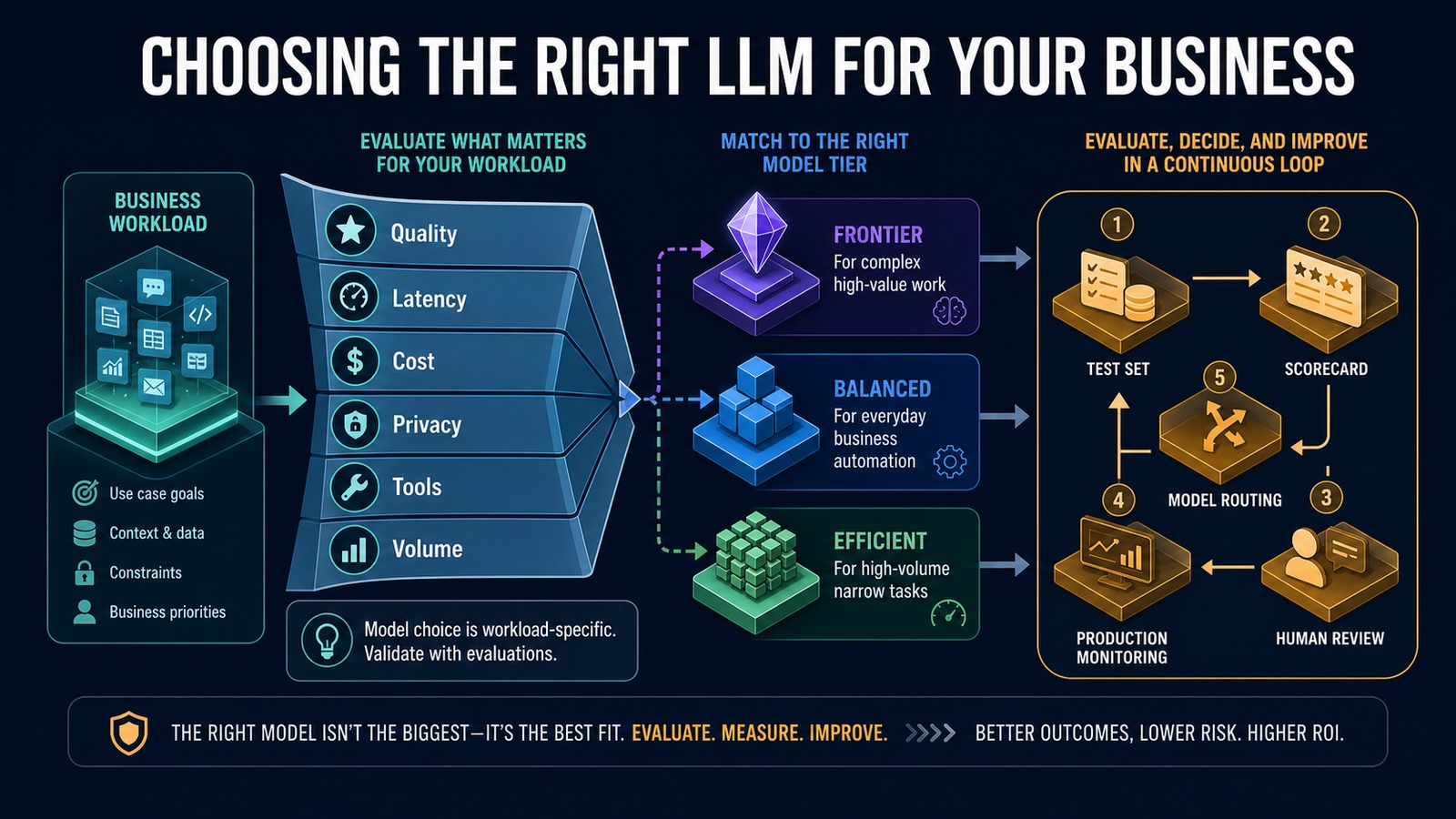
Decision framework for choosing a business LLM using quality, latency, cost, privacy, tools, volume, evaluations, and production monitoring
The right LLM is the model that meets a specific workload’s quality, risk, latency, and cost requirements.

Choosing a large language model is a business-design decision, not a contest to identify the most powerful model. A customer-support classifier, contract-review assistant, marketing-draft workflow, and complex research agent have different requirements. Using the same model for every task can create unnecessary cost, slow responses, or quality that is inadequate for the risk.

The practical approach is to define the workload, eliminate models that fail non-negotiable requirements, and compare a small shortlist using representative evaluations. The result may be one model—or a routing strategy that sends different tasks to different model tiers.

Problem: model selection often starts with marketing claims

Public benchmarks summarize broad capabilities, but they do not reproduce your documents, customers, tool schemas, prompts, response-time targets, or failure costs. A model that ranks highly on general reasoning may be excessive for extracting five fields from an invoice. A low-cost model may become expensive if employees must correct too many outputs.

Teams also compare token prices while ignoring the total cost of a completed task: retries, long prompts, tool calls, review time, latency, and errors. Selecting by one metric produces a fragile production decision.

Why it matters

The model influences answer quality, customer experience, operating cost, privacy design, integration options, and how much human review a workflow needs. A poor fit can make a useful idea appear unworkable. A workload-specific selection process can deliver the required result with a smaller, faster configuration.

Model selection also changes over time. Providers improve models, prices change, and business requirements evolve. Applications should make the model configurable and preserve an evaluation suite so changes can be tested rather than guessed.

Solution: select by workload and evidence

Start with the outcome. Define what a correct response looks like, how quickly it must arrive, what information it may process, which tools it must use, and what an error would cost. Then compare candidates on the same examples.

Current official OpenAI documentation describes GPT-5.6 Sol as the frontier option for complex professional work, GPT-5.6 Terra as the balance of intelligence and cost, and GPT-5.6 Luna as the efficient choice for cost-sensitive, high-volume workloads. These roles provide a useful shortlist, but your evaluations should make the final decision.

Six selection criteria

1. Quality

Measure task success, factual accuracy, groundedness, instruction following, structured-output validity, tool selection, and the severity of errors. Use human-reviewed examples that reflect normal and difficult cases.

2. Latency

Interactive assistants need fast perceived response; background document processing may tolerate more time. Measure median and slow-case latency with the full workflow, including retrieval and tools.

3. Total cost

Include input and output tokens, cached content, tools, retries, infrastructure, and human correction. Calculate cost per successfully completed business transaction rather than cost per API request.

4. Privacy and governance

Document the data involved, retention needs, access controls, deployment restrictions, and regulatory obligations. Minimize data, redact unnecessary fields, and confirm current provider policies for the account and service being used.

5. Capabilities and tools

Verify required modalities, context, structured output, function calling, file search, web search, vision, or realtime audio. Do not pay for capabilities the workflow does not use.

6. Volume and reliability

Estimate peak throughput, rate limits, concurrency, retry behavior, and fallback needs. High-volume narrow work often benefits from an efficient tier, while complex exceptions can be routed to a stronger model or a person.

Architecture

Business workload and risk classification ↓ Quality / Latency / Cost / Privacy / Tools / Volume ↓ Candidate model shortlist ↙ ↓ ↘ Frontier tier Balanced tier Efficient tier ↘ ↓ ↙ Representative evaluation dataset ↓ Accuracy, validity, latency, cost and review score ↓ Routing and approval policy ↙ ↘ Production model Human/fallback path ↘ ↙ Monitoring, regression tests and re-evaluation

Example: one business, three model tiers

A service company may use an efficient model to classify thousands of incoming messages into known queues. A balanced model can draft customer replies using CRM context and approved knowledge. A frontier model can handle complex research, ambiguous cases, or multi-tool planning where a quality improvement justifies higher cost and latency.

Incoming request ↓ Rule checks type, risk and complexity ↓ Simple classification → efficient model Routine grounded reply → balanced model Complex reasoning/tool workflow → frontier model High-risk or uncertain result → human review ↓ Outcome and correction feed the evaluation dataset

This routing design avoids using the most expensive option for every request while preserving a stronger path for difficult work.

Technology stack

  • OpenAI Responses API: model execution, tools, structured outputs, and multi-turn workflows.
  • OpenAI GPT-5.6 family: frontier, balanced, and efficient workload tiers.
  • Python: evaluation runner, schemas, scoring, routing, and test automation.
  • n8n: workflow triggers, approvals, integrations, and fallback handling.
  • PostgreSQL: test cases, traces, scores, cost, latency, and business outcomes.
  • vTiger: customer context and workflow results.
  • Docker: repeatable evaluation and application environments.

Implementation

1. Define the exact task

Write the input, expected output, constraints, users, systems, and completion criteria. Separate classification, extraction, drafting, reasoning, and tool-use tasks when possible.

2. Establish non-negotiables

Set the privacy, modality, tool, context, latency, throughput, and budget requirements. Remove candidates that cannot satisfy them.

3. Build a representative test set

Include normal, difficult, incomplete, adversarial, and high-risk cases. Preserve expected fields, acceptable answers, grading rubrics, and escalation conditions.

4. Test a small shortlist

Run the same prompt, tools, data, and output schema across candidates. Use fixed model versions when reproducibility matters.

5. Score business outcomes

Measure correctness, groundedness, schema validity, tool-call accuracy, latency, cost, corrections, and escalation. Weight serious mistakes more heavily than stylistic differences.

6. Tune configuration before upgrading

Improve instructions, retrieval, tool descriptions, schemas, and reasoning settings. A better system design may allow a smaller model to meet the requirement.

7. Design routing and fallback

Use deterministic rules to send work to the appropriate tier. Add retry limits, a stronger-model fallback where justified, and human review for consequential cases.

8. Monitor production

Track quality signals, corrections, latency, cost per successful task, tool failures, and drift. Add real failures to the evaluation set and re-test before changing models.

Benefits

  • Time savings: the right latency and capability for each workflow.
  • Money savings: efficient models handle high-volume narrow work.
  • Error reduction: representative evaluations expose failures before launch.
  • Customer experience: faster routine responses with stronger handling for complex cases.
  • Flexibility: configurable routing reduces dependence on one model choice.

Read also

Official OpenAI reference

OpenAI API model catalog and model-selection guidance

Choose the system, not only the model

The best LLM is the one that produces an acceptable business outcome inside your quality, latency, cost, privacy, and operational constraints. Start with evidence, keep model selection configurable, and route work according to complexity and risk. A disciplined evaluation process is more durable than any leaderboard.

Need help implementing this?
Contact Jupabequi for a free consultation.

Practical AI for Small Businesses: Where to Start and What to Automate

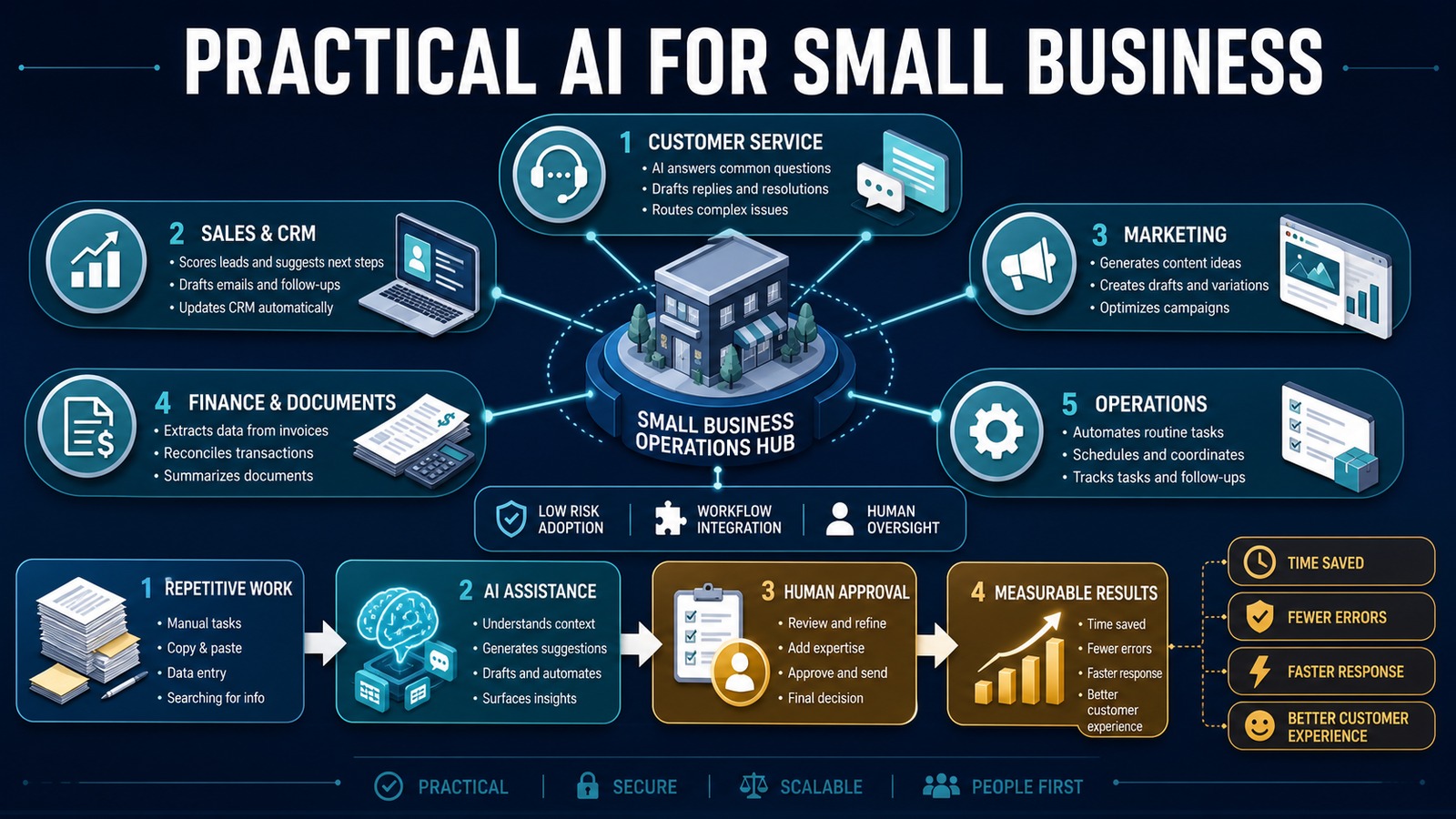
Practical AI use cases for small business across customer service, sales, marketing, finance, and operations with human oversight
A practical, people-first roadmap for adopting AI across small-business operations.

Practical AI is not about replacing an entire team or purchasing every new tool. It is about finding repeated work, adding focused intelligence, and improving a measurable business outcome. Small businesses can use AI to prepare customer responses, organize leads, extract information from documents, summarize activity, and help employees make faster decisions.

The best projects begin with a narrow workflow. They combine AI with existing systems, keep people involved when judgment matters, and measure whether the result actually saves time or improves service.

Problem: too much work, too little operational capacity

Small teams frequently perform several roles at once. A business owner may manage sales, customer service, marketing, purchasing, and billing in the same day. Employees copy information between email, spreadsheets, CRM records, and accounting software while important follow-ups wait in personal inboxes.

This produces slow responses, inconsistent records, missed opportunities, and limited visibility. Hiring may add capacity, but it does not automatically correct a fragmented process. Practical AI should first remove unnecessary administrative effort from work that already has a clear owner and outcome.

Why it matters

Customers compare a small business with every digital experience they use. They expect fast acknowledgment, accurate information, and consistent follow-up. AI can help a lean team deliver that experience without pretending that every interaction should be automated.

The business value appears in shorter response times, fewer manual touches, cleaner data, reduced rework, and more employee time for relationships and judgment. Those outcomes are more useful than counting how many AI tools the company purchased.

Five practical areas for AI

1. Customer service

AI can classify incoming requests, search approved knowledge, draft responses, summarize conversation history, and route complex cases. Routine questions receive faster attention while complaints, sensitive issues, and uncertain answers go to a person.

2. Sales and CRM

AI can extract contact details and buying intent from email, summarize calls, prepare follow-ups, identify missing CRM fields, and suggest the next action. Rules still control ownership, pipeline stages, permissions, and high-value approvals.

3. Marketing

AI can generate ideas, create first drafts, adapt approved content for different channels, summarize campaign feedback, and organize research. Employees should review accuracy, brand voice, legal claims, and customer context before publication.

4. Finance and documents

AI can extract data from invoices, classify documents, summarize contracts, and highlight missing information. Deterministic validation should check totals, duplicate invoice numbers, vendors, dates, and approval authority before records are updated.

5. Operations

AI can summarize daily activity, prepare schedules, route requests, generate checklists, detect patterns in support or service data, and produce management reports. The objective is a clearer next action, not another dashboard nobody reviews.

Solution: combine assistance, automation, and oversight

A practical system separates three responsibilities. AI interprets language and documents. Workflow automation moves data and applies business rules. People approve sensitive or consequential actions. This division keeps the system useful without granting the model unrestricted authority.

Start with assistance: let AI prepare a summary or draft. Then add integration so the output reaches the correct system. Finally, automate low-risk actions only after testing shows reliable performance.

Architecture

Email / Form / Document / CRM Event ↓ n8n workflow ↓ Security and validation rules ↓ OpenAI classification / extraction / drafting ↓ Structured-output validation ↙ ↘ Human review Safe automatic step ↘ ↙ vTiger / PostgreSQL / Email / Accounting ↓ Audit log, alerts and metrics

The workflow engine controls access and execution. Business systems remain the source of truth. AI receives only the information required for its task, and every important action can be traced to its source and approval.

Example: customer inquiry to qualified opportunity

Customer sends an email ↓ n8n captures the message ↓ AI identifies intent, service, urgency and contact details ↓ Rules validate fields and search vTiger for duplicates ↓ AI drafts a response and recommended next step ↓ Employee reviews unusual or high-value cases ↓ CRM is updated and customer receives a response

This workflow removes copying and preparation without removing ownership. If information is missing, the system drafts a clarification. If confidence is low, it creates a review task instead of guessing.

Technology stack

  • OpenAI: classification, extraction, summarization, and drafting.
  • n8n: orchestration, schedules, integrations, approvals, and retries.
  • vTiger: customer, lead, opportunity, and activity management.
  • PostgreSQL: workflow state, audit data, and reporting.
  • Python: specialized validation and document processing.
  • Docker: repeatable, isolated deployment.

Implementation

1. Inventory repeated work

Ask employees which tasks they repeat, where work waits, what they copy, and which errors require correction. Record volume and handling time.

2. Select one low-risk workflow

Choose a frequent process with clear inputs, an accountable owner, and a measurable outcome. Avoid unrestricted financial, legal, or employment decisions.

3. Establish the baseline

Measure response time, minutes per transaction, error rate, backlog, and customer outcome before making changes.

4. Map data and permissions

Identify sensitive information, systems of record, required retention, and who may approve each action. Give integrations the minimum access required.

5. Design structured output

Require named fields, allowed values, confidence, and evidence. Validate AI output before it reaches a business application.

6. Build the workflow backbone

Add triggers, deterministic rules, duplicate protection, retries, logging, and notifications. Place AI only at the step that requires interpretation.

7. Test and observe

Use normal, incomplete, conflicting, and adversarial examples. Begin with AI preparing work while employees approve the final action.

8. Measure and expand

Compare results with the baseline. Increase autonomy or add another workflow only when performance, risk, and maintenance justify it.

Benefits

  • Time savings: less searching, reading, copying, and drafting.
  • Money savings: more operational capacity without proportional overhead.
  • Error reduction: validated fields and consistent process execution.
  • Customer experience: faster responses and better-informed follow-up.
  • Employee experience: more attention for judgment, creativity, and relationships.

What not to automate first

Do not begin with high-impact decisions, poorly understood processes, or tasks that require empathy and negotiation. Avoid connecting AI directly to administrator accounts or allowing free-form output to trigger irreversible actions. If an error would create serious legal, financial, safety, or reputational harm, require human approval.

Read also

Start small and prove value

Practical AI begins with a business problem, not a product demonstration. Choose one repeated workflow, protect the data, keep authority in the governed process, and measure the outcome. A dependable improvement that saves a few hours every week is the foundation for a larger automation program.

Need help implementing this?

Contact Jupabequi for a free consultation.

The Complete Guide to AI Automation for Small Businesses

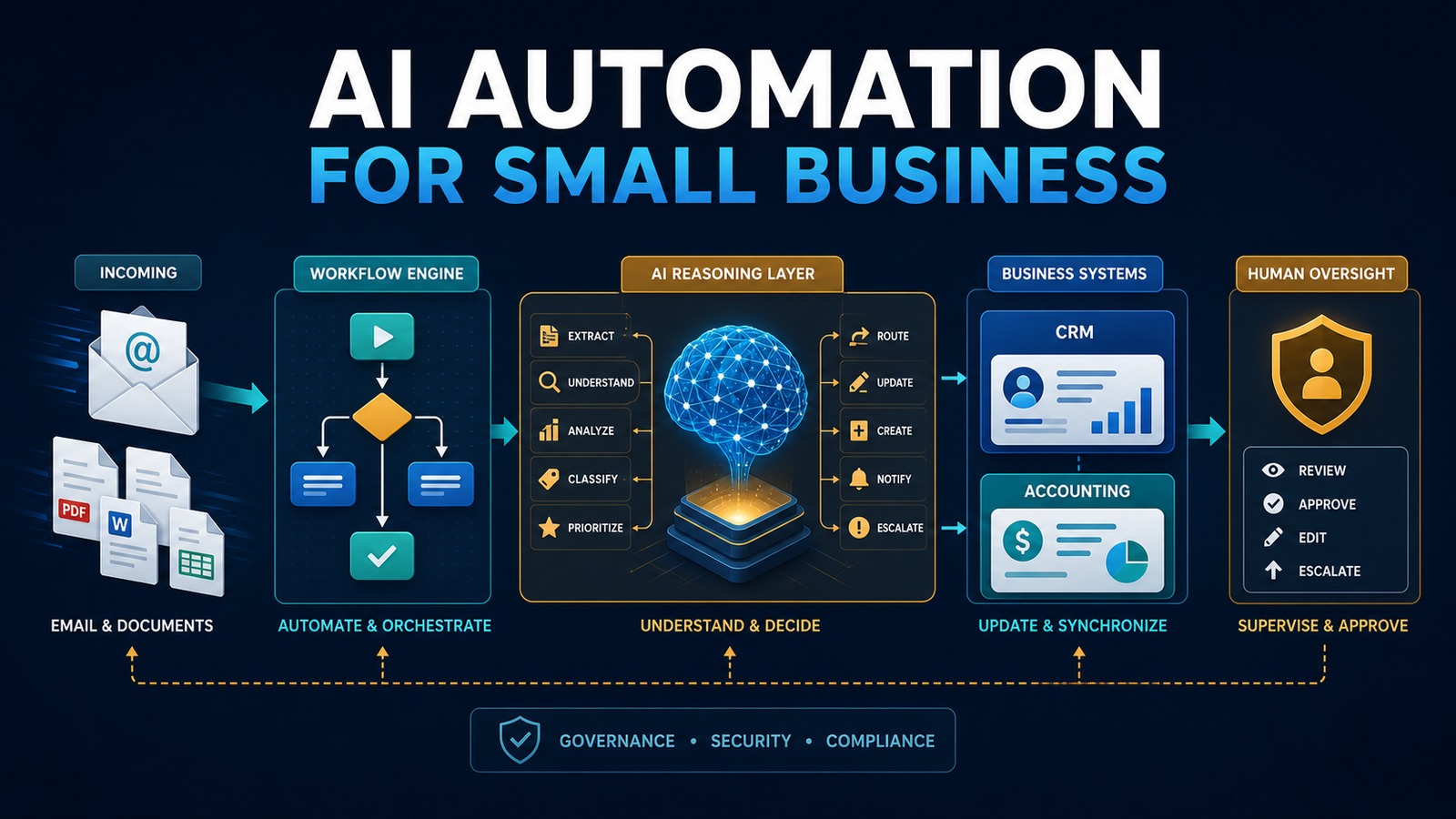
AI automation architecture for small businesses showing email, workflow orchestration, AI reasoning, business systems, and human oversight
A practical AI automation architecture for small businesses.

Small businesses rarely suffer from a shortage of work. They suffer from work that is repeated, delayed, copied between systems, and dependent on one person remembering the next step. A customer sends an email, an employee extracts the details, someone creates a CRM record, another person prepares a quote, and a manager follows up days later. Each task is manageable on its own. Together, they consume the time that should be spent serving customers and growing the business.

AI automation changes that operating model. It combines dependable workflow rules with artificial intelligence that can understand language, summarize documents, classify requests, extract information, and recommend an action. The result is not a robot replacing a company. It is a practical digital operations layer that moves information, prepares work, and asks a human for approval when judgment matters.

This guide explains how a small business can identify the right opportunities, design a secure architecture, select a technology stack, implement its first workflow, measure the return, and expand without creating an unmanageable collection of automations.

What AI automation means for a small business

Traditional automation follows explicit rules: when a form is submitted, create a record; when an invoice becomes overdue, send a reminder. AI adds the ability to work with information that is less structured. It can interpret the intent of an email, identify fields in a document, generate a draft response, match a request to a knowledge base, or decide which queue should receive a case.

The strongest systems use both approaches. Rules control predictable steps, while AI handles language and ambiguity. A workflow engine coordinates the process, business applications remain the systems of record, and people approve sensitive or high-impact actions.

For example, a service company might receive an inquiry by email. An automation can detect the message, extract the customer’s name, requested service, location, and urgency, then search for an existing contact in the CRM. It can create or update the opportunity, draft a response, assign the appropriate employee, and notify a manager when the request is unusually valuable or unclear. The employee begins with organized information instead of an empty screen.

Problem: invisible operational friction

Manual work is not always visible in financial reports. It appears as five minutes here, ten minutes there, and frequent interruptions throughout the day. Common examples include copying contact information, renaming and filing documents, preparing routine emails, checking whether a payment arrived, transferring data from a spreadsheet, requesting approval, and updating several applications with the same information.

These activities create four recurring problems:

  • Delay: work waits in inboxes and personal task lists.
  • Inconsistency: different employees follow different versions of the process.
  • Error: repetitive copying introduces missing, duplicated, or incorrect data.
  • Limited visibility: managers cannot easily see where a request is blocked or how long each step takes.

Hiring another person may increase capacity, but it does not correct a poorly designed workflow. The better first step is to make the process visible, remove unnecessary steps, and automate only the stable portions.

Why it matters

Speed and reliability shape the customer experience. A lead contacted in minutes receives a different impression from one contacted two days later. An accurate invoice gets paid more easily than one that requires correction. A service request with a complete history is resolved faster than one reconstructed from several inboxes.

Automation also protects employee attention. Every interruption has a switching cost. When software gathers the relevant information and presents a clear next action, employees can focus on judgment, relationships, creative work, and exceptions. This is especially valuable in a small business where one person may perform sales, operations, billing, and customer service duties in the same day.

The business impact should be measured in operational terms: shorter response time, fewer touches per transaction, fewer corrections, more consistent follow-up, improved conversion, reduced backlog, and greater capacity without proportional growth in administrative labor.

Solution: build a governed automation layer

A useful AI automation system has five layers. The first is the trigger: an email, form submission, uploaded document, CRM event, schedule, webhook, or database change. The second is orchestration, where a platform such as n8n applies rules, calls services, and records the outcome. The third is the AI layer, which performs a bounded task such as classification, extraction, summarization, or drafting. The fourth is the set of business systems such as vTiger, accounting software, email, document storage, or a PostgreSQL database. The fifth is human oversight.

Human oversight is not an admission that the system failed. It is a design control. Routine, reversible actions may run automatically. High-value quotes, financial changes, legal commitments, unusual customer messages, and low-confidence AI results should be reviewed. The workflow should make approval fast by showing the source, the proposed action, and the reason for escalation.

Architecture

A practical architecture looks like this:

Email / Form / Document ↓ n8n Workflow ↓ Validation and Security Rules ↓ OpenAI Classification / Extraction / Drafting ↓ Confidence and Policy Check ↙ ↘ Human Approval Automatic Action ↘ ↙ vTiger CRM / PostgreSQL / Email / Accounting ↓ Audit Log, Metrics, Alerts and Retry Queue

The workflow engine should be the conductor, not the permanent owner of business data. Customer records belong in the CRM, invoices in the accounting system, and documents in approved storage. The automation keeps only the state required to coordinate the process and troubleshoot failures.

Containerizing components with Docker can make deployment repeatable. Secrets should be stored in a credential manager or protected environment variables, never embedded in workflow definitions. Network access should be restricted, integrations should receive the minimum permissions they need, and logs should avoid unnecessary personal or confidential information.

Example: email to CRM with AI

Consider a company that receives sales requests through a shared mailbox. Today, an employee reads each message, determines whether it is a new lead or an existing customer, enters the details in vTiger, assigns an owner, and writes a response.

Customer Email ↓ n8n ↓ OpenAI extracts intent, contact details and requested service ↓ n8n validates required fields and checks confidence ↓ vTiger creates or updates the contact and opportunity ↓ Human reviews the proposed response when required ↓ Customer receives a timely, consistent reply

The AI is not given unlimited control of the mailbox or CRM. It receives only the content needed for the task. Its response follows a structured schema, such as JSON fields for intent, name, company, phone, service, urgency, summary, and confidence. n8n validates those fields before anything is written. If the email is ambiguous, potentially sensitive, or below the confidence threshold, the workflow creates a review task instead of guessing.

Technology stack

A flexible, self-hostable stack can include:

  • OpenAI: language understanding, extraction, classification, summarization, and drafting.
  • n8n: workflow orchestration, schedules, webhooks, integration logic, approvals, retries, and notifications.
  • Docker: consistent deployment and separation of services.
  • vTiger: customer, lead, opportunity, and activity management.
  • PostgreSQL: structured workflow state, reporting data, idempotency records, and audit events.
  • Python: specialized validation, document processing, data transformation, or internal APIs.

The right stack is the smallest stack that satisfies the requirements. A simple workflow may need only a form, n8n, an AI API, and the CRM. Additional components should solve a specific problem rather than make the architecture look impressive.

Choosing the first workflow

The best first project is frequent, measurable, moderately repetitive, and low enough in risk to improve safely. Score candidate processes from one to five across volume, time per occurrence, error rate, delay, data availability, rule stability, and business impact. Subtract points for regulatory sensitivity, irreversible actions, unclear ownership, and poor source data.

Strong starting points include lead intake, meeting summaries, document classification, invoice data extraction, appointment reminders, internal request routing, status notifications, and CRM data cleanup. Weak starting points include employee discipline, final legal decisions, unrestricted financial transactions, and processes that change every week.

Automate a narrow outcome first. “Automate sales” is too broad. “Create a qualified lead in the CRM from the website form within two minutes, while routing incomplete submissions to a review queue” is testable.

Implementation: a step-by-step method

1. Define the outcome

Write a one-sentence goal and baseline. Record the current volume, average handling time, wait time, correction rate, and responsible roles. Without a baseline, savings become an opinion rather than evidence.

2. Map the current process

Document the trigger, every decision, every application, the data transferred, approvals, exceptions, and final outcome. Ask employees what actually happens rather than relying only on a procedure manual. Remove redundant steps before automating them.

3. Classify risk

Identify personal information, confidential documents, financial authority, contractual commitments, and regulated data. Decide which actions may run automatically, which require approval, and which should remain fully manual. Define retention requirements and who may view logs.

4. Design the data contract

Specify exactly what the AI receives and must return. Use a structured output with required fields, allowed values, validation rules, and a confidence indicator. Reject missing or malformed results. Treat AI-generated content as untrusted input until it passes validation.

5. Build the happy path

Implement the most common valid case from trigger to completion. Use test accounts and non-production data. Give every transaction a unique identifier so a retry cannot create duplicate contacts, invoices, or notifications.

6. Add exceptions and approvals

List foreseeable failure modes: unavailable API, malformed attachment, duplicate customer, missing required field, rate limit, unexpected language, low confidence, and permission error. Each should have a deliberate response such as retry, quarantine, alert, or human review.

7. Test with representative examples

Create a test set that includes normal cases, edge cases, poor formatting, conflicting information, and malicious or irrelevant instructions inside incoming content. Verify not only the AI response but also the final CRM record, notification, audit event, and retry behavior.

8. Run in observation mode

For the first period, let the automation prepare actions without executing sensitive ones. Compare its recommendations with employee decisions. Adjust prompts, rules, thresholds, and data mappings based on documented errors.

9. Release gradually

Begin with a subset of transactions or one team. Keep a manual fallback. Monitor failures daily during the initial release, then move to weekly operational review once performance stabilizes.

10. Document ownership

Assign a business owner for the process and a technical owner for the automation. Record credentials, dependencies, data fields, approval rules, recovery steps, and change history. An automation without an owner becomes operational debt.

Security, privacy, and governance

Use least-privilege accounts for every integration. A workflow that only creates CRM leads should not have permission to delete all contacts. Separate development and production credentials, require multi-factor authentication for human administrators, rotate secrets, patch containers, and back up workflow definitions and databases.

Minimize the information sent to an AI service. Redact fields that are not needed. Establish an approved-use policy describing which data may be processed, which tools employees may use, and which decisions require review. Maintain an audit record that connects the original input, model output, validation result, human approval, and final system action.

Prompt injection deserves explicit attention. An incoming email or document may contain text telling the AI to ignore its task or reveal information. The workflow must treat external content as data, restrict available tools, enforce schemas and policies outside the model, and never rely on the model alone to authorize an action.

Reliability and operational design

Production automation must expect failure. APIs time out, credentials expire, payloads change, and external systems become unavailable. Use bounded retries with increasing delay, a dead-letter or review queue for unresolved transactions, and alerts that contain enough context to act without exposing secrets.

Design for idempotency: processing the same event twice should not produce two invoices or two customers. Store the source event ID and check it before creating records. Use correlation IDs across systems so an employee can trace one transaction from the trigger through every step.

Version workflows and prompts. Test changes against a stable evaluation set before deployment. Monitor the percentage completed automatically, approval rate, correction rate, processing time, API cost, and failures by cause. A workflow is a business service, not a one-time configuration.

Measuring benefits and ROI

Measure benefits conservatively. Monthly labor capacity can be estimated as transaction volume multiplied by minutes saved, divided by sixty. Multiply those hours by the fully loaded hourly cost, then add measurable gains such as avoided corrections, faster collection, recovered leads, or increased capacity. Subtract software, implementation, maintenance, and review costs.

Monthly benefit = (transactions × minutes saved ÷ 60 × hourly cost) + avoided error cost + attributable revenue gain − platform and maintenance cost

Track four groups of benefits:

  • Time savings: handling time, waiting time, backlog, and after-hours work.
  • Money savings: labor capacity, avoided rework, faster payment, and reduced leakage.
  • Error reduction: duplicate records, missing fields, incorrect routing, and compliance exceptions.
  • Customer experience: response time, resolution time, consistency, satisfaction, and conversion.

Do not count every saved minute as cash. Often the value appears as additional capacity, faster service, and the ability to grow without immediately adding administrative overhead.

Common mistakes to avoid

  • Automating a broken process before simplifying it.
  • Starting with a broad transformation instead of a bounded workflow.
  • Allowing free-form AI output to write directly into business systems.
  • Giving integrations administrator permissions for convenience.
  • Ignoring duplicate events, retries, and partial failures.
  • Measuring impressive demonstrations rather than business outcomes.
  • Removing human review from consequential decisions too early.
  • Launching without documentation, monitoring, or an accountable owner.

Read also

Start with a business outcome

AI automation succeeds when it is designed as an operational system rather than a technology experiment. Start with a specific bottleneck, combine rules with bounded AI tasks, validate every output, preserve human judgment, and measure the result. One dependable workflow that improves response time and data quality is more valuable than ten impressive prototypes.

Need help implementing this?

Contact Jupabequi for a free consultation.