Practical AI for Small Businesses: Where to Start and What to Automate
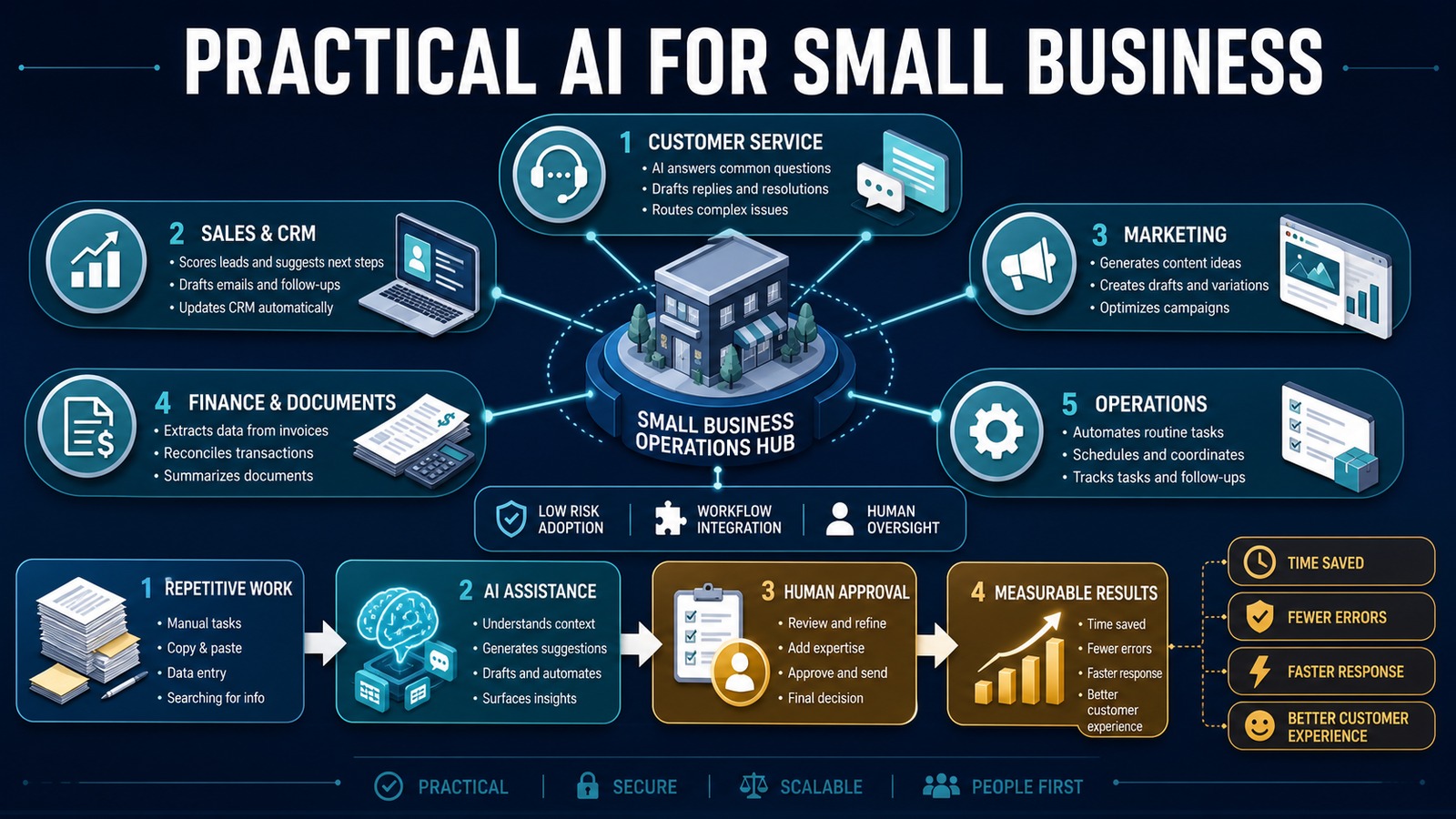
Practical AI is not about replacing an entire team or purchasing every new tool. It is about finding repeated work, adding focused intelligence, and improving a measurable business outcome. Small businesses can use AI to prepare customer responses, organize leads, extract information from documents, summarize activity, and help employees make faster decisions.
The best projects begin with a narrow workflow. They combine AI with existing systems, keep people involved when judgment matters, and measure whether the result actually saves time or improves service.
Problem: too much work, too little operational capacity
Small teams frequently perform several roles at once. A business owner may manage sales, customer service, marketing, purchasing, and billing in the same day. Employees copy information between email, spreadsheets, CRM records, and accounting software while important follow-ups wait in personal inboxes.
This produces slow responses, inconsistent records, missed opportunities, and limited visibility. Hiring may add capacity, but it does not automatically correct a fragmented process. Practical AI should first remove unnecessary administrative effort from work that already has a clear owner and outcome.
Why it matters
Customers compare a small business with every digital experience they use. They expect fast acknowledgment, accurate information, and consistent follow-up. AI can help a lean team deliver that experience without pretending that every interaction should be automated.
The business value appears in shorter response times, fewer manual touches, cleaner data, reduced rework, and more employee time for relationships and judgment. Those outcomes are more useful than counting how many AI tools the company purchased.
Five practical areas for AI
1. Customer service
AI can classify incoming requests, search approved knowledge, draft responses, summarize conversation history, and route complex cases. Routine questions receive faster attention while complaints, sensitive issues, and uncertain answers go to a person.
2. Sales and CRM
AI can extract contact details and buying intent from email, summarize calls, prepare follow-ups, identify missing CRM fields, and suggest the next action. Rules still control ownership, pipeline stages, permissions, and high-value approvals.
3. Marketing
AI can generate ideas, create first drafts, adapt approved content for different channels, summarize campaign feedback, and organize research. Employees should review accuracy, brand voice, legal claims, and customer context before publication.
4. Finance and documents
AI can extract data from invoices, classify documents, summarize contracts, and highlight missing information. Deterministic validation should check totals, duplicate invoice numbers, vendors, dates, and approval authority before records are updated.
5. Operations
AI can summarize daily activity, prepare schedules, route requests, generate checklists, detect patterns in support or service data, and produce management reports. The objective is a clearer next action, not another dashboard nobody reviews.
Solution: combine assistance, automation, and oversight
A practical system separates three responsibilities. AI interprets language and documents. Workflow automation moves data and applies business rules. People approve sensitive or consequential actions. This division keeps the system useful without granting the model unrestricted authority.
Start with assistance: let AI prepare a summary or draft. Then add integration so the output reaches the correct system. Finally, automate low-risk actions only after testing shows reliable performance.
Architecture
Email / Form / Document / CRM Event ↓ n8n workflow ↓ Security and validation rules ↓ OpenAI classification / extraction / drafting ↓ Structured-output validation ↙ ↘ Human review Safe automatic step ↘ ↙ vTiger / PostgreSQL / Email / Accounting ↓ Audit log, alerts and metrics
The workflow engine controls access and execution. Business systems remain the source of truth. AI receives only the information required for its task, and every important action can be traced to its source and approval.
Example: customer inquiry to qualified opportunity
Customer sends an email ↓ n8n captures the message ↓ AI identifies intent, service, urgency and contact details ↓ Rules validate fields and search vTiger for duplicates ↓ AI drafts a response and recommended next step ↓ Employee reviews unusual or high-value cases ↓ CRM is updated and customer receives a response
This workflow removes copying and preparation without removing ownership. If information is missing, the system drafts a clarification. If confidence is low, it creates a review task instead of guessing.
Technology stack
- OpenAI: classification, extraction, summarization, and drafting.
- n8n: orchestration, schedules, integrations, approvals, and retries.
- vTiger: customer, lead, opportunity, and activity management.
- PostgreSQL: workflow state, audit data, and reporting.
- Python: specialized validation and document processing.
- Docker: repeatable, isolated deployment.
Implementation
1. Inventory repeated work
Ask employees which tasks they repeat, where work waits, what they copy, and which errors require correction. Record volume and handling time.
2. Select one low-risk workflow
Choose a frequent process with clear inputs, an accountable owner, and a measurable outcome. Avoid unrestricted financial, legal, or employment decisions.
3. Establish the baseline
Measure response time, minutes per transaction, error rate, backlog, and customer outcome before making changes.
4. Map data and permissions
Identify sensitive information, systems of record, required retention, and who may approve each action. Give integrations the minimum access required.
5. Design structured output
Require named fields, allowed values, confidence, and evidence. Validate AI output before it reaches a business application.
6. Build the workflow backbone
Add triggers, deterministic rules, duplicate protection, retries, logging, and notifications. Place AI only at the step that requires interpretation.
7. Test and observe
Use normal, incomplete, conflicting, and adversarial examples. Begin with AI preparing work while employees approve the final action.
8. Measure and expand
Compare results with the baseline. Increase autonomy or add another workflow only when performance, risk, and maintenance justify it.
Benefits
- Time savings: less searching, reading, copying, and drafting.
- Money savings: more operational capacity without proportional overhead.
- Error reduction: validated fields and consistent process execution.
- Customer experience: faster responses and better-informed follow-up.
- Employee experience: more attention for judgment, creativity, and relationships.
What not to automate first
Do not begin with high-impact decisions, poorly understood processes, or tasks that require empathy and negotiation. Avoid connecting AI directly to administrator accounts or allowing free-form output to trigger irreversible actions. If an error would create serious legal, financial, safety, or reputational harm, require human approval.
Read also
- The Complete Guide to AI Automation for Small Businesses
- What Is an AI Agent?
- AI vs Traditional Automation
Start small and prove value
Practical AI begins with a business problem, not a product demonstration. Choose one repeated workflow, protect the data, keep authority in the governed process, and measure the outcome. A dependable improvement that saves a few hours every week is the foundation for a larger automation program.
Need help implementing this?