What Is an AI Agent? A Practical Guide for Small Businesses
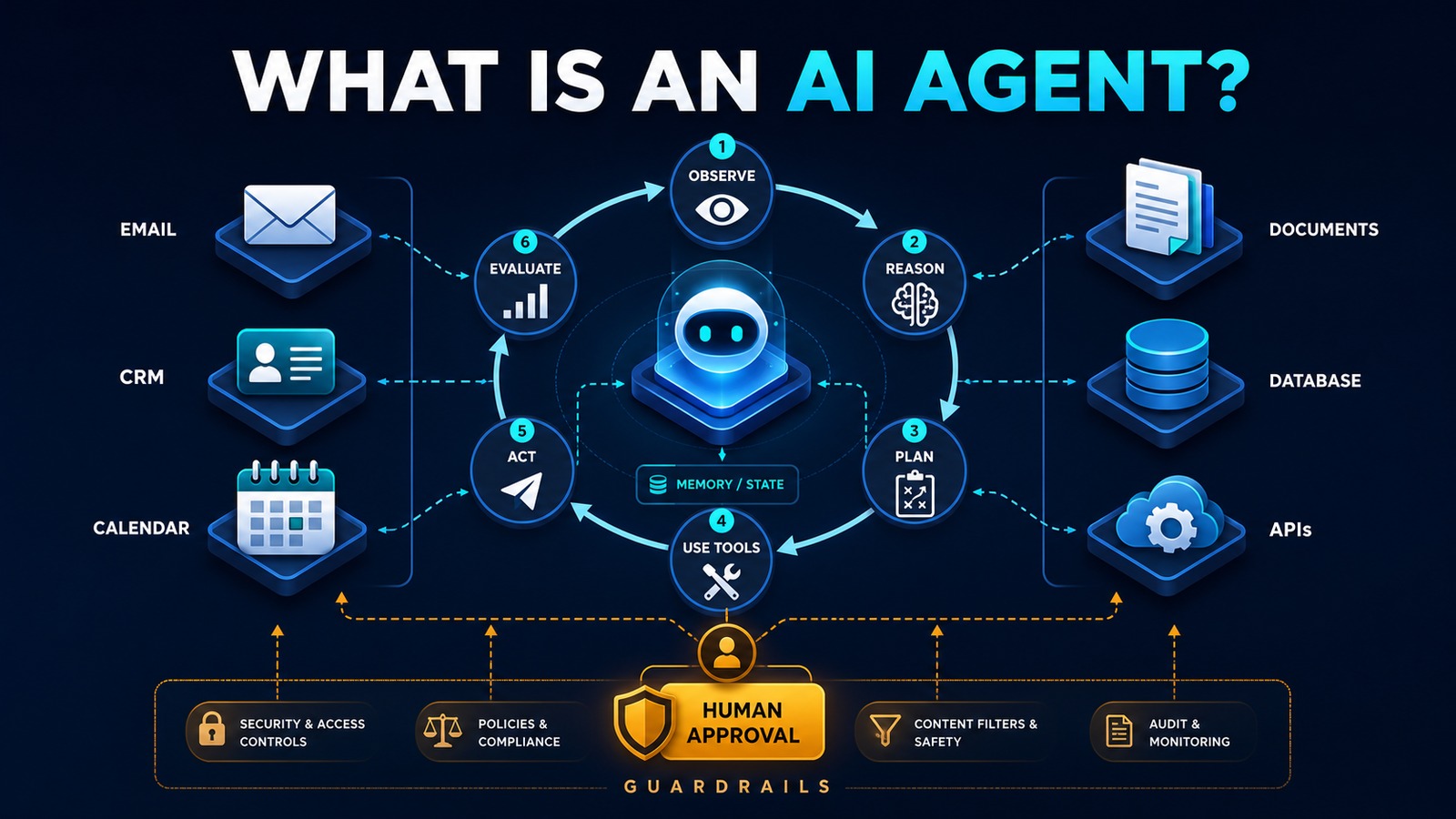
An AI agent is software that can pursue a defined goal, gather context, decide what to do next, use approved tools, and evaluate the result. Unlike a basic chatbot that primarily responds with text, an agent can take part in a multi-step business process: it may check a CRM record, read a document, prepare a response, create a task, or request human approval.
The important word is defined. A useful business agent is not an unlimited digital employee. It has a specific job, bounded permissions, clear instructions, approved data sources, and rules for when to stop or escalate. Those boundaries make an agent reliable enough to support real operations.
Problem: business work crosses too many systems
Many small-business processes begin with unstructured information. A customer sends an email, attaches a document, asks several questions, and expects a prompt response. An employee must interpret the request, look up the customer, check availability, update the CRM, create a task, and write a reply. The work is not difficult because any one step is complex; it is difficult because the employee must coordinate information across several applications.
Traditional automation handles predictable rules well, but it struggles when the input varies. A rule can copy a form field into a database. It cannot easily determine whether a free-form message is a sales inquiry, support request, billing question, or urgent complaint. That gap is where an AI agent can help.
Why it matters
Small teams lose capacity to repeated reading, searching, copying, and switching between applications. Delays also affect customers. A lead that waits overnight in a shared inbox may go elsewhere, while an incomplete CRM record creates problems for every later interaction.
An agent can prepare the next step immediately and consistently. Employees spend less time reconstructing context and more time using judgment, building relationships, and handling exceptions. The business gains faster response, cleaner records, a visible audit trail, and a repeatable process that does not depend on one person remembering every step.
What makes software an AI agent?
A production agent normally contains six capabilities:
- Goal and instructions: a precise definition of the task, priorities, limits, and completion criteria.
- Context: the customer message, business rules, approved documents, CRM history, or other information required for the task.
- Reasoning and planning: the ability to determine which step should happen next rather than following only one fixed path.
- Tools: controlled functions for searching, reading, calculating, creating records, sending notifications, or calling APIs.
- State or memory: enough retained information to continue a multi-step task and avoid repeating completed work.
- Evaluation and oversight: checks that determine whether the result is valid, whether another step is needed, or whether a person must review it.
The language model is only one component. The surrounding workflow, permissions, validation, logging, and human approval determine whether the agent is safe and operationally useful.
AI agent versus chatbot versus traditional automation
A chatbot usually waits for a question and produces an answer. A traditional automation follows predefined triggers and rules. An AI agent can interpret a goal, select an approved tool, observe the result, and continue until it reaches a completion or escalation condition.
These approaches are complementary. A chatbot can be the user interface, traditional automation can enforce deterministic rules, and an agent can handle the ambiguous reasoning between them. The best design uses ordinary code whenever a rule is sufficient and AI only where interpretation or flexible decision-making creates value.
Solution: a bounded agent workflow
A practical small-business agent should operate inside an orchestrated workflow. n8n can receive the trigger, validate the request, provide the agent with approved tools, and enforce policy outside the model. The agent can analyze the task and propose actions, while vTiger, PostgreSQL, email, and calendars remain the systems of record.
Risk determines autonomy. Reading a public knowledge article is low risk. Drafting a customer email is moderate risk. Sending a refund, changing payment details, or accepting a contract is high risk. Low-risk actions may run automatically; higher-risk actions should pause for human approval.
Architecture
Customer request or system event ↓ n8n trigger ↓ Validation and access policy ↓ AI agent controller ↙ ↓ ↘ Context Memory Approved tools ↓ Observe → Reason → Plan → Act → Evaluate ↓ Confidence, policy and completion check ↙ ↘ Human approval Safe automatic action ↘ ↙ CRM, email, calendar, database ↓ Audit log and metrics
This structure separates reasoning from authority. The agent may recommend an action, but the workflow decides whether the action is permitted. Tool inputs are validated, credentials are isolated, and every important step receives a correlation ID so it can be traced later.
Example: an AI lead-qualification agent
Imagine a consulting company receiving a new inquiry by email. The agent’s goal is to prepare a complete CRM opportunity and a draft response within two minutes.
Email arrives ↓ n8n extracts message and attachments ↓ Agent identifies intent, service, urgency and missing details ↓ Agent searches vTiger for the contact ↓ Agent prepares a CRM update and response draft ↓ Policy checks confidence and estimated opportunity value ↓ Manager approves unusual or high-value cases ↓ vTiger is updated and the response is sent
If the contact already exists, the agent attaches the inquiry to the existing record. If required information is missing, it drafts a concise clarification. If the message contains a complaint or sensitive information, it routes the case to a person. The agent does not invent missing data or bypass the review rules.
Technology stack
- OpenAI: language understanding, structured extraction, planning, and response drafting.
- n8n: triggers, orchestration, tool execution, approvals, retries, and notifications.
- vTiger: customer, lead, opportunity, and activity records.
- PostgreSQL: workflow state, idempotency keys, audit events, and reporting.
- Python: specialized validation, document processing, or internal tool APIs.
- Docker: repeatable deployment and service isolation.
Implementation
1. Choose one narrow job
Define a measurable outcome such as “classify incoming leads and prepare a CRM update.” Avoid goals such as “manage sales,” which are too broad to test or govern.
2. Write the operating policy
List what the agent may read, which tools it may call, which records it may change, and which actions require approval. Set maximum steps, cost limits, timeouts, and escalation conditions.
3. Design structured inputs and outputs
Require fields such as intent, contact details, summary, proposed action, confidence, and reason for escalation. Validate types and allowed values before a tool receives the data.
4. Build tools with minimal permissions
Create focused actions such as “find contact,” “create draft opportunity,” or “request approval.” Do not give the agent a general administrator credential when a limited API function is enough.
5. Add human approval
Present the source, proposed action, supporting evidence, and editable fields in one review step. Approval should be quick without hiding uncertainty.
6. Test normal and adversarial cases
Include incomplete requests, duplicates, conflicting data, unexpected languages, unavailable APIs, and instructions embedded in customer content. External content must always be treated as untrusted data.
7. Launch in observation mode
Let the agent prepare recommendations while employees make the final decisions. Compare results, correct failure patterns, and increase autonomy only when evidence supports it.
8. Monitor production
Track completion rate, escalation rate, corrections, latency, cost, tool failures, and business outcomes. Version instructions and tools, and test changes before deployment.
Benefits
- Time savings: less reading, searching, copying, and application switching.
- Money savings: increased capacity without proportional administrative overhead.
- Error reduction: validated fields, consistent routing, and fewer duplicate records.
- Customer experience: faster responses with better context and more consistent follow-up.
- Visibility: logged decisions, measurable processing time, and clear exception queues.
Common risks and safeguards
Agents can misunderstand a request, call the wrong tool, repeat an action, or follow malicious instructions hidden in content. Safeguards include least-privilege access, schema validation, idempotency controls, tool allowlists, step limits, content filtering, audit logs, and human approval for consequential actions.
Memory also requires discipline. Store only what is necessary, define retention, separate customers, and prevent sensitive details from appearing in logs. An agent should be able to explain which source and tool result supported its action.
How to know whether you need an agent
Use an agent when the task is multi-step, contains variable language or documents, requires choosing among approved actions, and has a clear completion condition. Use traditional automation when the path is predictable. Keep the task manual when the decision depends on empathy, negotiation, legal authority, or context that cannot be represented safely.
A good first agent is narrow, frequent, reversible, and measurable. Lead triage, inbox routing, appointment preparation, document intake, and weekly reporting are stronger starting points than unrestricted financial or legal decisions.
Read also
- The Complete Guide to AI Automation for Small Businesses
- AI Development guides
- Business Automation articles
Start with controlled capability
An AI agent is valuable because it can coordinate information and actions across a workflow, not because it is autonomous in every situation. Give it one clear goal, the minimum tools required, strong validation, and a reliable path to human judgment. That combination turns an impressive demonstration into a dependable business system.
Need help implementing this?