Document Approval with AI: A Human-in-the-Loop Workflow
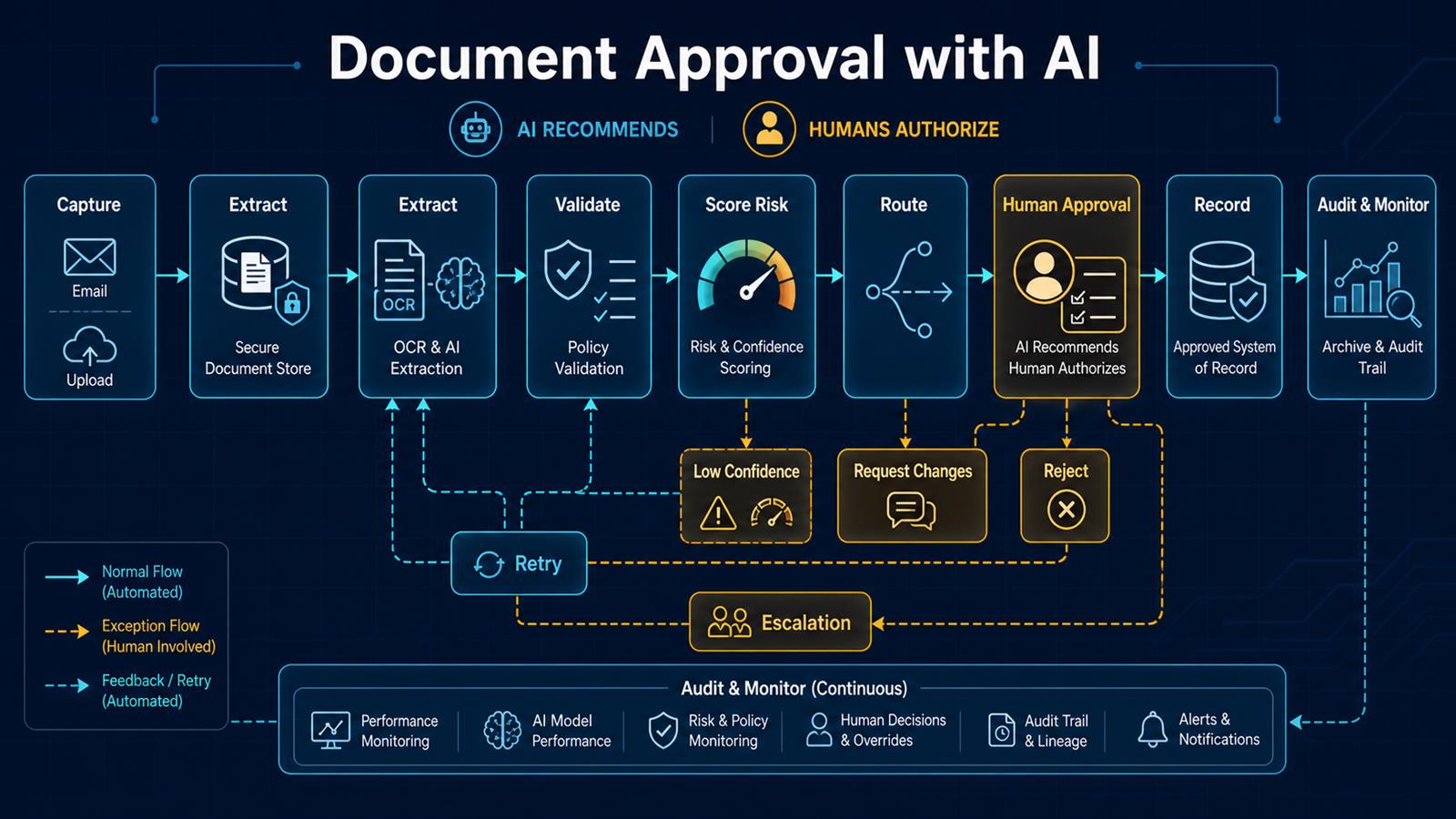
human-in-the-loop AI document approval architecture with capture, extraction, validation, risk scoring, routing, authorization, and audit
AI can prepare and recommend; accountable people still authorize consequential document decisions.

Document approval is a strong use case for practical AI because much of the delay happens before the decision. Someone must open a file, identify its type, extract key terms, compare them with policy, find the right approver, and summarize what matters. AI can accelerate that preparation while a controlled workflow keeps authority, evidence, and accountability with the organization.

Problem

Contracts, purchase requests, policies, permits, change orders, and other documents often move through email and shared folders. Reviewers receive incomplete context, approvals are difficult to trace, versions become confused, and urgent requests bypass normal controls. Manual review also spends expert time on routine extraction instead of judgment.

A fully autonomous AI approval is not the answer. Models can misread a clause, overlook an exception, or express confidence in an incorrect interpretation. High-impact decisions need explicit policy checks, access controls, human authorization, and a preserved audit trail.

Why it matters

Approval delays slow purchasing, projects, customer commitments, and internal operations. Weak controls create financial, legal, privacy, and compliance exposure. A dependable process must improve speed without losing separation of duties or making decisions impossible to explain later.

The business value comes from shortening preparation and routing time, making exceptions visible, and giving reviewers a consistent decision package: original document, extracted facts, policy results, risks, supporting records, and a recommended action.

Solution

Use n8n as an orchestration layer. Capture the document securely, preserve the original, extract structured fields with OCR and an LLM, validate those fields with deterministic rules, assign a risk and confidence tier, and route the request to the correct approver. AI produces a summary and recommendation; the authorized person approves, rejects, or requests changes.

Low-confidence extraction, policy conflicts, sensitive content, unusual values, and missing evidence should always enter an exception path. Every transition records who or what acted, the input version, the rules applied, the model configuration where relevant, and the final human decision.

Architecture

Email / Portal / Business system
              ↓
 Secure intake + immutable original
              ↓
      OCR and AI extraction
              ↓
 Schema validation + policy rules
              ↓
 Risk tier + field confidence score
        ↙                  ↘
 Low confidence          Normal case
        ↓                  ↓
 Exception review     Approval routing
        ↘                  ↙
 Approve / Reject / Request changes
              ↓
      Approved system of record
              ↓
 Archive + audit trail + monitoring

Example workflow

Consider a vendor contract submitted for approval:

Contract uploaded
     ↓
n8n stores file and calculates document hash
     ↓
AI extracts parties, term, renewal, value,
termination, indemnity, privacy, and governing law
     ↓
Rules compare results with approved policy
     ↓
AI creates cited summary and flags unusual clauses
     ↓
Route to business owner, legal, security, or finance
     ↓
Reviewer approves, rejects, or requests changes
     ↓
Decision and approved version recorded
     ↓
Obligations and renewal dates create follow-up tasks

The reviewer should be able to jump from every extracted claim to the relevant page or passage. If the document changes, the workflow creates a new version and invalidates any approval tied to the earlier content hash.

Technology Stack

  • n8n: intake, branching, approvals, reminders, retries, and integrations.
  • OCR: text and layout extraction from PDFs and scans.
  • OpenAI or another approved LLM: structured extraction, classification, comparison, and summaries.
  • Document storage: versioned originals with access controls and retention policy.
  • PostgreSQL: workflow state, idempotency, decision metadata, and audit references.
  • Business system APIs: procurement, CRM, case management, finance, or records systems.
  • Identity and access management: role-based authorization and approver identity.
  • Monitoring: failures, latency, exceptions, overrides, and model-quality metrics.

Implementation

1. Select one document and decision

Begin with a repeatable document type, clear policy, known approvers, and measurable delay. Define what the workflow may recommend and what always requires human authorization.

2. Map policy and authority

Document required evidence, thresholds, approver roles, separation of duties, escalation rules, and prohibited automatic actions. Convert objective conditions into deterministic checks.

3. Secure intake and preserve evidence

Authenticate uploads, restrict file types and size, scan files as required, store the original, calculate a hash, and issue a unique request ID. Avoid sending sensitive documents to unapproved services.

4. Define a structured schema

Specify exact fields, types, allowed values, citations, and confidence requirements. Validate model output before using it. Missing or malformed fields should fail closed into review.

5. Separate AI judgment from policy rules

Use AI for language-heavy work such as identifying clauses or summarizing changes. Use code and rules for thresholds, required approvals, permissions, dates, and record state.

6. Require evidence and confidence

Attach page-level citations to extracted claims and set field-specific confidence thresholds. A confident overall score must not hide one uncertain critical field.

7. Route by risk and context

Route using document type, value, department, jurisdiction, data sensitivity, exceptions, and approval limits. Define fallback owners, deadlines, reminders, and escalation paths.

8. Design the human decision screen

Show the original, version, extracted data, citations, policy checks, exceptions, related records, and recommendation together. Capture comments and a reason for overrides or rejection.

9. Protect version integrity

Bind approval to a document hash or immutable version ID. Any content change should create a new version and, when material, trigger re-review.

10. Build retries and exception handling

Retry transient OCR, API, and network failures with capped backoff. Do not retry policy failures as technical errors. Maintain a manual queue with enough context to resolve each exception.

11. Test adversarial and realistic cases

Test poor scans, missing pages, conflicting clauses, handwritten edits, tables, prompt-injection text inside documents, duplicate submissions, unauthorized approvers, and system outages.

12. Monitor quality and outcomes

Track cycle time, extraction accuracy, low-confidence rate, policy exceptions, human overrides, approval aging, rework, failures, and downstream corrections. Review samples regularly as documents and policies change.

Benefits

  • Time savings: reviewers receive prepared decision packages instead of searching through documents.
  • Money savings: less administrative effort and fewer delays or missed obligations.
  • Error reduction: consistent extraction, policy checks, version control, and routing.
  • Customer experience: faster decisions and clearer requests for missing information.
  • Governance: authority remains explicit, traceable, and reviewable.
  • Scalability: routine preparation grows without removing expert oversight.

Industry insight: automate preparation, not accountability

The safest and most useful pattern is simple: AI reads, extracts, compares, and recommends; policy constrains; humans authorize; the system records. Organizations should expand automation only after evidence shows the workflow is accurate, secure, understandable, and easier to govern than the manual process it replaces.

Read also

Need help implementing this? Contact Jupabequi for a free consultation.
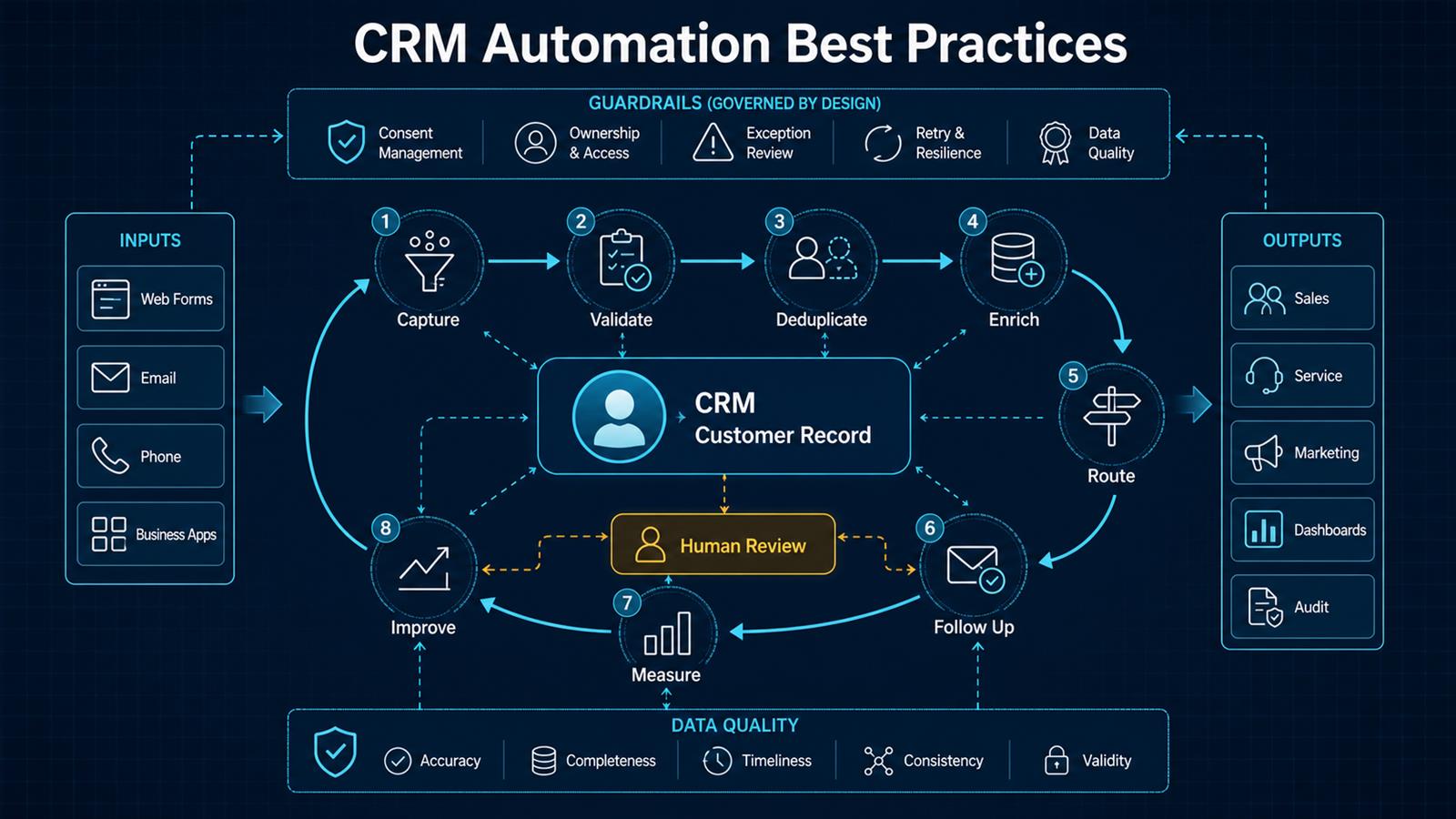
CRM Automation Best Practices: Build Reliable Customer Workflows

CRM automation best practices architecture showing capture, validation, deduplication, enrichment, routing, follow-up, measurement, and human review
Effective CRM automation combines reliable workflows, clean customer data, human review, and measurable business outcomes.

CRM automation should help people act on better customer information at the right time. It should not create a maze of triggers that nobody owns. The most successful systems start with a defined customer journey, make data quality a first-class requirement, and automate repetitive decisions while preserving human judgment for exceptions and important relationships.

Problem

Customer data enters through web forms, email, phone calls, spreadsheets, advertising platforms, support tools, and business applications. Without a consistent process, leads are assigned late, follow-ups are missed, duplicate records multiply, lifecycle stages mean different things to different teams, and reports cannot be trusted.

Many organizations respond by adding more automations. That can make the problem worse. A workflow built on incomplete data may send the wrong message, overwrite a record, assign work to the wrong person, or repeatedly trigger itself. Automation magnifies the quality of the process it is given.

Why it matters

The CRM is often the shared memory of sales, marketing, and service. Its accuracy affects response time, pipeline forecasts, customer experience, workload distribution, and management decisions. When users stop trusting it, they create private spreadsheets and inbox-based processes, making the official system even less complete.

Good automation reverses that cycle. It reduces data entry, makes ownership visible, prompts timely action, and records outcomes. Users receive useful assistance, so they are more likely to maintain the data that makes future automation reliable.

Solution

Design CRM automation as a governed lifecycle: capture, validate, deduplicate, enrich, route, follow up, measure, and improve. Use deterministic rules for identity, required fields, ownership, consent, and lifecycle transitions. Use AI selectively for classification, summarization, suggestions, and unstructured content, with confidence thresholds and human review.

Keep orchestration in a platform such as n8n when the process spans the CRM, email, forms, calendars, and internal systems. Store authoritative customer state in the CRM. This separation makes integrations easier to test, monitor, and change without hiding business logic across multiple applications.

Architecture

Web forms / Email / Phone / Business apps
                    ↓
          Intake and source tracking
                    ↓
 Validate → Normalize → Consent check
                    ↓
       Search, match, and deduplicate
                    ↓
         Enrich approved fields
                    ↓
    CRM customer record and lifecycle state
              ↙             ↘
       Route owner       Create next action
              ↘             ↙
        Sales / Service / Marketing
                    ↓
      Measure outcomes and data quality
                    ↓
        Improve rules and workflows

Exception path: low confidence or policy conflict → Human review

Example workflow

A prospect requests a consultation from the website:

Website form
     ↓
n8n validates required fields and consent
     ↓
Normalize email, phone, company, and source
     ↓
Search vTiger for matching contact or lead
     ↓
Existing? ─ Yes → update permitted fields
     ↓ No
Create lead with source and campaign context
     ↓
Route by territory, service, and availability
     ↓
Create follow-up activity with response deadline
     ↓
Send acknowledgement and notify owner
     ↓
Track response, qualification, and conversion

If the email already belongs to a customer, the workflow should enrich the existing relationship instead of creating a new lead. If routing information is missing or two records are plausible matches, the item goes to a review queue.

Technology Stack

  • vTiger CRM: customer records, lifecycle stages, activities, ownership, and reporting.
  • n8n: event intake, integration logic, branching, retries, and notifications.
  • REST APIs and webhooks: controlled exchange between forms, CRM, email, and business systems.
  • PostgreSQL: durable workflow state, mappings, audit metadata, and reconciliation checkpoints where needed.
  • Docker: repeatable deployment for an appropriately secured self-hosted environment.
  • AI services: optional classification, summaries, intent detection, and suggested actions.
  • Monitoring: execution health, exceptions, latency, and business outcome dashboards.

Implementation

1. Start with a measurable business outcome

Choose one outcome such as reducing first-response time, increasing complete lead records, or eliminating unassigned inquiries. Record the current baseline and define the target before building the workflow.

2. Map the customer lifecycle

Define what prospect, lead, qualified lead, opportunity, customer, inactive customer, and other stages mean. Specify the allowed transitions, required evidence, responsible role, and next action for each stage.

3. Establish data ownership

For every important field, decide which system and team owns it. Do not let an external form overwrite verified account data. Record source and last-update time for values that may conflict.

4. Normalize data at intake

Standardize email, telephone, country, state, company, dates, campaign source, and product-interest values. Validate required fields and quarantine malformed submissions before they enter the CRM.

5. Design identity and duplicate rules

Use stable keys and a match hierarchy rather than one fragile field. Exact email may be strong for a person, while an account may require domain, legal name, address, or external customer ID. Ambiguous matches need review, not an automatic merge.

6. Make routing explicit

Route by geography, service, account status, language, workload, and availability. Define a fallback owner, response deadline, escalation path, and reassignment behavior so nothing remains unowned.

7. Automate the next action

Create a task, reminder, acknowledgement, or service activity when a meaningful event occurs. Avoid excessive notifications. Each automation should answer who needs to act, what they need to do, and by when.

8. Apply AI with boundaries

AI can classify an inquiry, summarize a conversation, extract details, or draft a response. Validate structured outputs, use confidence thresholds, protect sensitive data, and require approval for high-impact communications or changes.

9. Build for retries and idempotency

Store a source-event ID so retrying an event does not create another record or activity. Retry transient failures with controlled backoff, separate permanent validation failures, and send actionable exceptions to a review queue.

10. Test with realistic edge cases

Test existing customers, shared email addresses, blank values, international phone numbers, duplicate delivery, inactive owners, expired credentials, API limits, and partial outages. Confirm that bad inputs fail safely.

11. Measure adoption and outcomes

Monitor record completeness, duplicate rate, unassigned records, time to first response, overdue activities, conversion by source, workflow failure rate, and manual-review volume. Technical success without a business outcome is not enough.

12. Review automations regularly

Assign an owner to every workflow. Document its trigger, purpose, dependencies, fields changed, failure path, and retirement criteria. Review automations when products, teams, permissions, policies, or CRM fields change.

Benefits

  • Time savings: less manual entry, assignment, follow-up creation, and status chasing.
  • Money savings: fewer lost leads, duplicate records, and hours spent repairing data.
  • Error reduction: validation and ownership rules create more consistent customer records.
  • Customer experience: faster, better-informed responses with fewer repeated questions.
  • Management visibility: reliable lifecycle stages and activity data improve reporting.
  • Scalability: teams can handle more customer activity without proportionally adding administration.

Common mistakes to avoid

  • Automating an undefined process.
  • Creating records before checking identity and consent.
  • Using AI where a deterministic rule is clearer and safer.
  • Allowing blank or low-confidence values to overwrite verified data.
  • Building workflows without a fallback owner or exception queue.
  • Measuring executions instead of customer and business outcomes.
  • Leaving automations undocumented and unowned.

Read also

Need help implementing this? Contact Jupabequi for a free consultation.
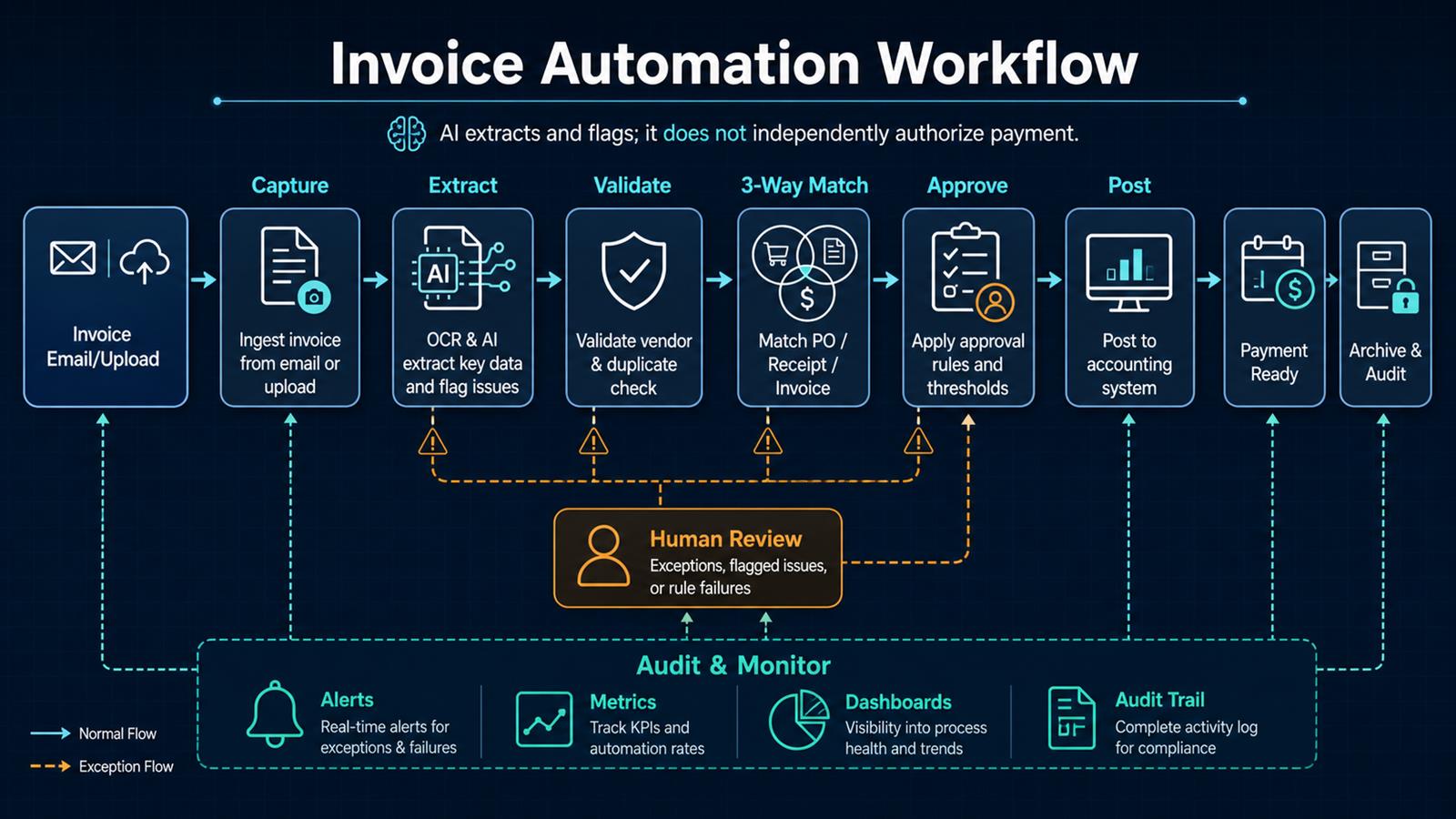
Invoice Automation Workflow: From Capture to Approval and Audit

invoice automation workflow from capture and AI extraction through validation, three-way matching, approval, accounting, audit, and monitoring
A controlled invoice workflow automates routine processing while routing exceptions and payment authorization to the right people.

Invoice automation is often described as a faster way to enter bills. That misses the larger opportunity. A good workflow creates a controlled path from invoice receipt to an approved accounting entry: it captures every document, extracts structured data, detects duplicates, checks business rules, matches supporting records, routes exceptions, and preserves an audit trail. The result is not simply less typing. It is a more visible and dependable accounts-payable process.

Problem

Invoices arrive through individual inboxes, shared mailboxes, vendor portals, scans, and file uploads. Finance staff download attachments, rename files, copy fields into an accounting system, search for purchase orders, ask managers for approval, and follow up when information is missing. Status is scattered across email threads and spreadsheets.

This manual process creates predictable risks: the same invoice can be submitted twice, incorrect vendor or bank information can go unnoticed, approvals can stall, early-payment discounts can be missed, and month-end close becomes a hunt for incomplete records. Simply adding OCR does not solve those control problems.

Why it matters

Accounts payable affects cash flow, supplier relationships, financial reporting, and fraud exposure. An invoice paid twice is a direct loss. An invoice posted to the wrong account distorts reporting. A missing approval weakens the audit trail. Slow processing also makes it harder to forecast upcoming cash requirements and answer a vendor asking when payment will occur.

Automation makes the process measurable. Leaders can see cycle time, straight-through processing rate, exception reasons, approval bottlenecks, duplicate flags, and invoices approaching their due dates. Those measurements reveal where policy, vendor data, or purchasing practices need improvement.

Solution

Build a staged workflow in n8n or a similar orchestration platform. Centralize intake, store the original document, extract invoice fields with OCR and AI, and validate the output against vendor records and deterministic rules. When purchase orders are used, compare the invoice with the purchase order and receipt. Route clean invoices according to approval thresholds and send exceptions to a human with the evidence needed to decide.

AI should extract, classify, summarize, and flag uncertainty. It should not independently authorize a payment. Approval policy, separation of duties, vendor-change verification, and accounting controls remain explicit business rules owned by the organization.

Architecture

Invoice email / upload / scan
              ↓
      Central intake and archive
              ↓
       OCR + AI field extraction
              ↓
 Vendor validation + duplicate detection
              ↓
 PO ↔ Receipt ↔ Invoice three-way match
         ↙                 ↘
   Clean invoice         Exception
         ↓                 ↓
 Approval rules       Human review
         ↘                 ↙
        Approved accounting entry
              ↓
       Payment-ready queue
              ↓
    Audit trail + metrics + alerts

Separate each stage so it has one responsibility and a visible outcome. Preserve the original file and extracted values, record confidence and validation results, and attach the final accounting record ID. That lineage makes troubleshooting and audits much easier than one large opaque workflow.

Example workflow

A vendor emails a PDF invoice to a dedicated address:

Vendor email
     ↓
n8n verifies sender and saves attachment
     ↓
OCR/AI extracts vendor, invoice number, date,
currency, PO number, line items, tax, and total
     ↓
Rules validate totals, vendor status, and duplicates
     ↓
System matches purchase order and receipt
     ↓
Within tolerance? ── No → AP exception review
     ↓ Yes
Route by amount, department, and cost center
     ↓
Manager approves
     ↓
Post bill to accounting system
     ↓
Archive evidence and notify AP

If the amount, quantity, tax, or vendor details do not match, the workflow stops before posting and shows the reviewer exactly which check failed. If the same vendor and invoice number already exist—or the document closely resembles a previously processed invoice—it is held for duplicate review.

Technology Stack

  • n8n: email or upload triggers, routing, API integrations, retries, and notifications.
  • OCR and document AI: extraction of header fields, line items, totals, and document confidence.
  • Accounting or ERP API: vendor master, purchase orders, receipts, bills, and posting status.
  • PostgreSQL: checkpoints, idempotency keys, exception states, and audit metadata when required.
  • Docker: repeatable deployment for an appropriately secured self-hosted workflow.
  • Object storage: controlled retention of original invoices and supporting evidence.
  • Email or collaboration tools: approval requests, reminders, and exception alerts.
  • Monitoring: workflow health, latency, failure rate, and operational dashboards.

Implementation

1. Measure the current process

Document monthly invoice volume, intake channels, average processing time, approval time, exception rate, duplicate incidents, and cost per invoice. Select a narrow first scope, such as invoices sent to one shared mailbox for one business unit.

2. Centralize intake

Use a dedicated mailbox or secure upload endpoint. Generate a source-event ID, store the original message and attachment, reject unsupported file types, scan files as required by security policy, and prevent the same message from being processed twice.

3. Define the invoice schema

Specify required fields and formats: legal vendor identity, invoice number, dates, currency, purchase-order reference, line descriptions, quantities, unit prices, tax, subtotal, and total. Normalize dates, decimals, currencies, and identifiers before downstream comparisons.

4. Extract data with confidence controls

Run OCR and structured extraction, then retain field-level confidence where available. Use deterministic checks to confirm that line amounts add to the subtotal and that subtotal, tax, and adjustments equal the total. Low-confidence or inconsistent results go to review rather than being guessed.

5. Validate the vendor and detect duplicates

Match the invoice to an approved vendor record. Check combinations such as vendor ID, normalized invoice number, amount, date, purchase order, and document fingerprint. Never accept bank-detail changes solely because they appear on an invoice; verify them through an approved, independent process.

6. Perform two-way or three-way matching

For purchase-order invoices, compare invoice values to the PO and, when receiving data exists, the goods or service receipt. Configure documented tolerances for quantity, unit price, tax, freight, and total. A mismatch should create a specific exception, not a generic failure.

7. Route approvals by policy

Determine approvers using amount, department, cost center, project, vendor, and exception type. Set deadlines, reminders, escalation paths, and delegated-approval rules. Preserve separation of duties: invoice preparation, approval, payment release, and reconciliation should not all belong to one person.

8. Post only approved records

Create the bill in the accounting system only after required checks and approvals succeed. Use idempotent behavior so a retry cannot create a second bill. Store the returned accounting record ID, status, and timestamp with the workflow execution.

9. Design exception and recovery paths

Separate extraction errors, validation failures, policy exceptions, authentication failures, rate limits, and system outages. Retry only transient problems with capped backoff. Give reviewers the original document, extracted fields, related PO and receipt, rule result, and recommended next action.

10. Monitor controls and outcomes

Track intake-to-posting time, approval aging, straight-through rate, exception rate by cause, duplicate flags, retry volume, and posting failures. Reconcile invoices received, approved, posted, paid, and archived so missing transitions become visible.

Benefits

  • Time savings: routine capture, validation, matching, routing, and posting happen without repetitive entry.
  • Money savings: fewer duplicate payments, fewer corrections, and better visibility into due dates and discounts.
  • Error reduction: totals, vendor data, purchase orders, receipts, and policies are checked consistently.
  • Customer experience: vendors receive faster answers because invoice status is visible.
  • Control: approvals, exceptions, evidence, and system actions create a traceable history.
  • Focus: finance staff spend more time resolving meaningful exceptions and less time moving files.

Start with control, then optimize speed

The best first target is not “zero-touch payment.” It is complete intake, reliable extraction, visible exceptions, documented approval, and safe posting. Once those controls are stable, the organization can increase straight-through processing for trusted vendors and low-risk invoice types. Automation should make accountability clearer, not remove it.

Read also

Need help implementing this? Contact Jupabequi for a free consultation.
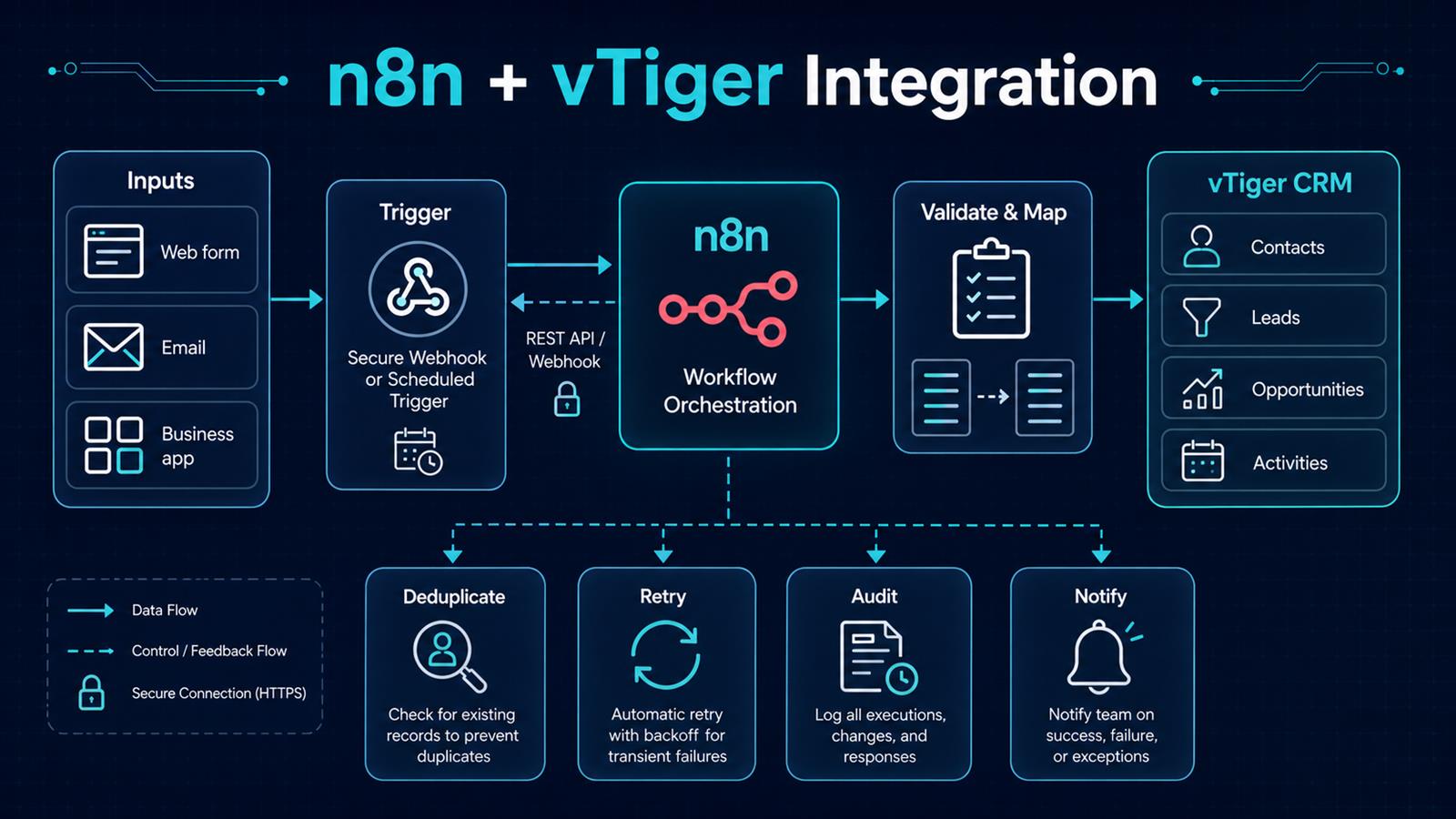
n8n + vTiger Integration: A Reliable CRM Automation Guide

n8n and vTiger CRM integration architecture showing secure triggers, validation, mapping, deduplication, retries, auditing, and notifications
A production-ready n8n and vTiger integration separates intake, validation, CRM updates, and operational controls.

Connecting n8n to vTiger can turn a CRM from a passive database into the operational center of a business. New inquiries can become leads automatically, qualified leads can create opportunities, customer messages can create follow-up activities, and teams can be notified without copying data between systems. The useful part is not merely moving fields. It is building a dependable process that validates data, prevents duplicates, records what happened, and recovers when an API call fails.

Problem

Small businesses often collect customer information through web forms, shared inboxes, spreadsheets, ecommerce systems, and line-of-business applications. Employees then re-enter that information into vTiger. Manual entry delays response times and produces missing fields, duplicate contacts, inconsistent ownership, and opportunities that never receive a follow-up task.

A simplistic integration only replaces typing with an API call. It can still create duplicates, overwrite good information with empty values, expose an unsecured webhook, or silently lose a record during an outage. Reliable CRM automation must account for both the happy path and the exceptions.

Why it matters

CRM data drives sales forecasts, service history, marketing segmentation, and management reporting. If records arrive late or contain inconsistent values, every downstream decision becomes less trustworthy. A well-designed integration shortens lead-response time, gives salespeople complete context, and makes the process measurable. It also reduces the hidden cost of reconciliation: finding duplicate records, checking whether an update succeeded, and reconstructing activity after a failure.

Solution

Use n8n as the orchestration layer between business systems and vTiger. An event enters through an authenticated production webhook when real-time processing is available, or through a Schedule Trigger when polling is more appropriate. n8n validates the payload, translates external fields into a stable internal schema, looks for an existing CRM record, and then creates or updates the appropriate vTiger module through its API.

Operational branches record the result, retry transient failures with controlled backoff, and notify a person only when attention is necessary. For critical processes, combine real-time webhooks with a scheduled reconciliation workflow so a missed event can be detected later.

Architecture

Web form / Email / Business application
                    ↓
       Secure webhook or schedule
                    ↓
              n8n workflow
                    ↓
     Validate → Normalize → Map fields
                    ↓
       Search vTiger for existing record
              ↙             ↘
          Create            Update
              ↘             ↙
     Contact / Lead / Opportunity / Activity
                    ↓
        Audit log → Notify → Reconcile

Failure path: classify error → retry with backoff → alert → manual queue

Keep the integration contract explicit. Define one canonical representation for names, email addresses, phone numbers, dates, source codes, owners, and consent fields. The input system speaks its own language, vTiger speaks another, and the mapping step provides a controlled translation between them.

Example workflow

Consider a consultation request submitted on a website:

Website form
     ↓
Authenticated n8n webhook
     ↓
Validate email, consent, and required fields
     ↓
Normalize phone number and campaign source
     ↓
Search vTiger by normalized email
     ↓
Create or update Contact and Lead
     ↓
Create follow-up Activity for the assigned owner
     ↓
Send acknowledgement and notify sales
     ↓
Write record ID, execution ID, and outcome to audit log

The workflow should return a quick success response to the form when appropriate, while longer CRM and notification work continues in a controlled path. If the same request is delivered twice, an idempotency key or source-event ID prevents a second lead from being created.

Technology Stack

  • n8n: triggers, transformation, branching, API calls, retries, and notifications.
  • vTiger CRM: contacts, leads, opportunities, activities, ownership, and sales history.
  • REST API and webhooks: authenticated exchange between systems.
  • Docker: repeatable self-hosted deployment when appropriate.
  • PostgreSQL: n8n persistence and, when needed, integration checkpoints or audit data.
  • Reverse proxy and TLS: HTTPS termination, access controls, and stable production endpoints.
  • Monitoring: execution metrics, failure alerts, and reconciliation reports.

Implementation

1. Define the business event and owner

Start with one concrete event, such as “consultation form submitted,” and define the expected CRM result. Name the person responsible for exceptions. Decide which system owns each field so the automation does not overwrite authoritative information.

2. Choose webhook, polling, or a hybrid

Use a webhook when the source supports reliable real-time delivery. Use scheduled polling when it does not, tracking a durable timestamp or cursor. For high-value processes, add a lower-frequency reconciliation job even when webhooks are the primary trigger.

3. Secure credentials and endpoints

Store secrets in n8n credentials rather than workflow fields. Require HTTPS and authenticate incoming requests with a supported header, token, or signature. Restrict network access where practical, minimize credential permissions, and avoid writing personal data or tokens into routine logs.

4. Build a canonical data model

Create a Set or Code step immediately after intake that produces stable field names and formats. Normalize case, whitespace, telephone numbers, dates, country codes, and source values. Reject or quarantine payloads that fail required validation instead of sending malformed data to the CRM.

5. Authenticate to vTiger and test reads first

Configure the appropriate vTiger API authentication for the deployed edition and version. Test a harmless query before enabling writes. Confirm module names, required fields, field types, ownership rules, pagination, and API limits against the documentation for that specific installation.

6. Add duplicate detection and idempotency

Search using a stable business key such as a normalized email address, customer number, or source-system ID. Store the source event ID with the result when possible. Repeat delivery of the same event should return the existing outcome rather than create another CRM record.

7. Separate create and update rules

Do not treat an update as a complete replacement. Only write fields that the source is allowed to own, and do not replace a populated CRM value with a blank input. Record the vTiger ID returned by a successful create or update for downstream activities and auditability.

8. Design failure handling

Retry temporary network errors, rate limits, and server failures with a capped delay. Do not blindly retry validation or authentication errors. Route unrecoverable items to an exception queue with a safe payload reference, error class, execution ID, and a clear remediation step.

9. Test realistic edge cases

Test duplicates, missing required fields, accented names, unexpected phone formats, expired credentials, vTiger downtime, slow responses, and repeated webhook delivery. Use production webhook URLs only after the n8n workflow is activated, and keep test data clearly separated from real customer records.

10. Monitor and reconcile

Track success rate, latency, retries, failures, duplicate prevention, and records awaiting manual review. A scheduled reconciliation workflow can compare source events with recorded vTiger IDs and surface gaps before users discover them.

Benefits

  • Time savings: customer information reaches the CRM without repetitive entry.
  • Money savings: staff spend less time reconciling systems and correcting avoidable data issues.
  • Error reduction: validation, mapping, and deduplication make records more consistent.
  • Customer experience: faster routing and follow-up reduce the delay after an inquiry.
  • Visibility: audit records and alerts show whether each event succeeded, retried, or needs attention.
  • Scalability: the same pattern can support forms, inboxes, invoicing, support, and other business applications.

Read also

Build the integration around the business process

The strongest n8n and vTiger integrations are intentionally unexciting in production: records arrive once, fields are predictable, errors are visible, and recovery is routine. Begin with a narrow workflow and measurable service level, then reuse the secure intake, canonical mapping, idempotency, retry, and monitoring patterns across other processes.

Need help implementing this? Contact Jupabequi for a free consultation.
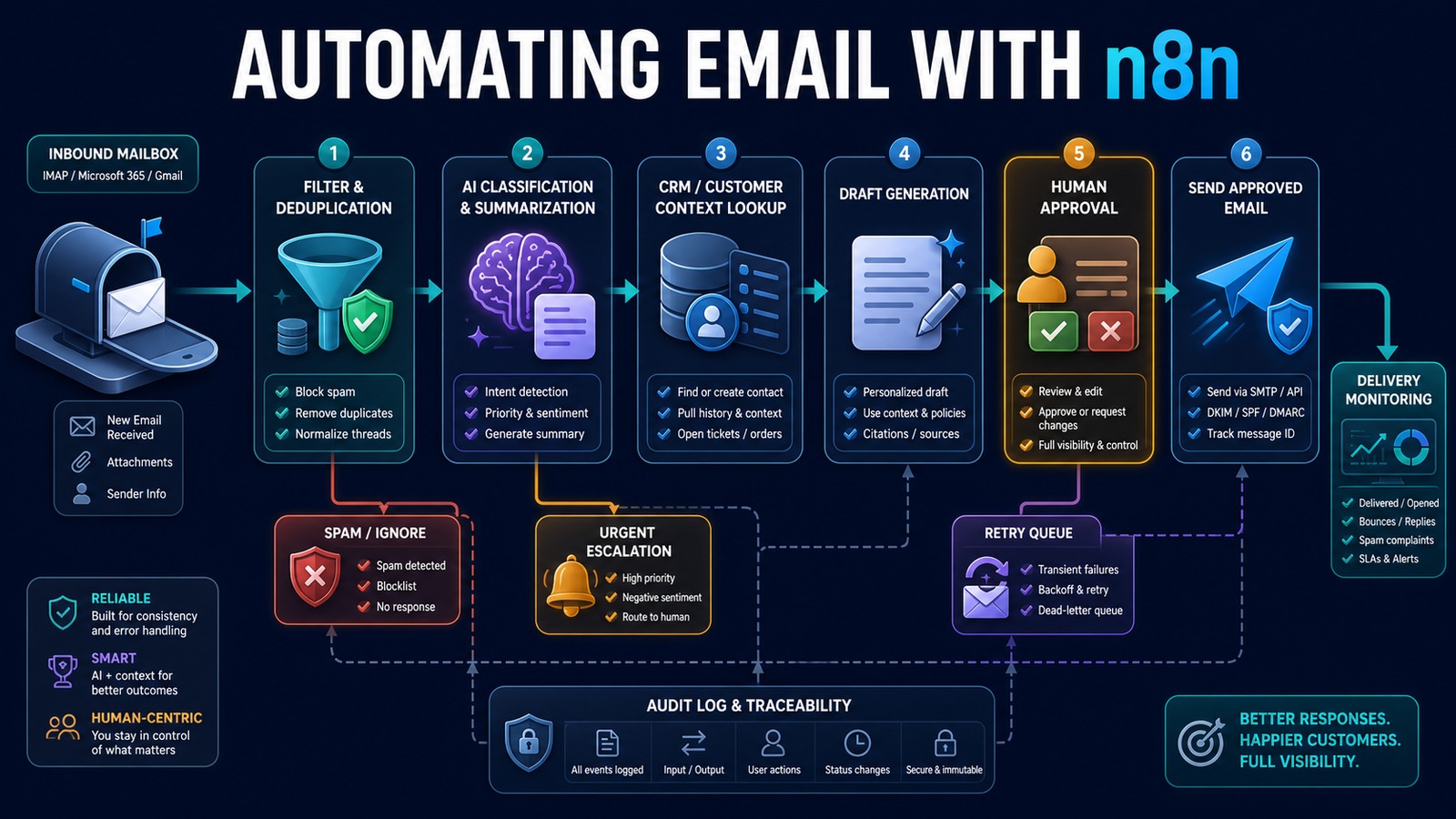
Automating Email with n8n: A Reliable Human-in-the-Loop Workflow

n8n email automation architecture with filtering, AI classification, CRM context, draft generation, human approval, sending, retries, and monitoring
A reliable email workflow separates intake, interpretation, approval, delivery, and monitoring.

Email is one of the best places to demonstrate practical automation because it connects customers, sales, support, vendors, and internal operations. It is also easy to automate badly. A workflow that sends duplicates, answers the wrong person, exposes private information, or damages deliverability can create more work than it saves.

n8n provides a visual orchestration layer for receiving messages, applying rules, using AI where interpretation helps, retrieving CRM context, requesting approval, sending through an authorized mailbox, and recording the result. The goal is not “AI answers every email.” The goal is faster, more consistent handling with clear control over what may be sent automatically.

Problem: shared inboxes hide operational work

Incoming messages often wait for someone to read, classify, assign, research, and answer them. Employees repeatedly copy contact details into a CRM, search earlier conversations, prepare similar responses, and notify coworkers. Urgent messages can be buried while routine questions consume attention.

Simple autoresponders acknowledge receipt but do not understand intent or connect the message to a business process. Unrestricted AI auto-replies introduce a different risk: plausible but inaccurate commitments can be sent without review.

Why it matters

Response time shapes customer trust and lead conversion. Consistency matters too: two customers should not receive contradictory instructions because different employees used different templates. A well-designed workflow reduces handling time, preserves a complete history, and makes urgent or unusual cases visible.

Email automation must also protect sender reputation. Authentication, reasonable sending volume, suppression rules, accurate reply threading, and failure monitoring are operational requirements—not optional polishing.

Solution: automate preparation before autonomy

Start by automating intake, classification, CRM lookup, and draft preparation. Keep a person in the approval loop for outbound replies until testing demonstrates that a narrow category is safe for automatic handling.

AI is useful for intent classification, summarization, extraction, and drafting. Deterministic n8n steps should control allowed senders, monitored folders, duplicate protection, CRM writes, approval requirements, recipients, sending limits, and retries.

Architecture

Gmail / Outlook / IMAP mailbox
              ↓
       n8n email trigger
              ↓
 Filter folders, senders and auto-generated mail
              ↓
 Normalize content and calculate message ID
              ↓
 Duplicate check and thread lookup
              ↓
 AI intent, urgency, summary and structured fields
              ↓
 vTiger customer and conversation context
              ↓
 Draft reply and recommended action
       ↙               ↓               ↘
 Ignore/spam       Human approval     Urgent escalation
                         ↓
              Gmail / SMTP send
                         ↓
        CRM update, audit log and metrics
                         ↓
             Retry queue and alerts

Example: sales and support inbox

A shared mailbox receives a pricing question from an existing customer. n8n captures the message, removes quoted history for analysis, checks the message ID, and searches vTiger using the sender address. AI classifies the intent as sales, extracts the requested service, summarizes relevant history, and prepares a draft grounded in an approved service description.

New customer email
       ↓
Message and duplicate validation
       ↓
AI returns JSON: intent, urgency, summary, requested service
       ↓
vTiger lookup returns customer and account owner
       ↓
AI prepares a concise draft using approved context
       ↓
Account owner approves or edits
       ↓
n8n sends the threaded response
       ↓
CRM activity and workflow outcome are recorded

A complaint, legal request, payment change, unsubscribe, or low-confidence classification bypasses routine drafting and is escalated. The workflow never invents prices, discounts, availability, or policy.

Technology stack

  • n8n: email triggers, branching, waits, approvals, retries, and integrations.
  • Gmail, Microsoft 365, IMAP, or SMTP: authorized message intake and delivery.
  • OpenAI: structured classification, summarization, extraction, and reply drafting.
  • vTiger: contacts, opportunities, owners, and interaction history.
  • PostgreSQL: idempotency keys, workflow state, audit events, and metrics.
  • Docker: repeatable n8n and database deployment.

Implementation

1. Choose one mailbox and outcome

Define which folder or label is monitored and what success means: classification, assignment, CRM update, draft preparation, or approved sending. Avoid automating an entire inbox at once.

2. Configure credentials securely

Use OAuth where available or provider-approved application credentials. Store them in n8n’s credential system, restrict permissions, and never embed passwords or API keys in workflow nodes.

3. Build filtered intake

Exclude outgoing mail, automated notifications, spam, and unsupported attachments. Preserve sender, recipients, subject, message ID, thread identifiers, timestamps, text, and attachment metadata.

4. Add duplicate protection

Store the provider message ID before consequential actions. If the trigger or workflow retries, it should resume safely without sending another response or creating another CRM record.

5. Define structured AI output

Require a schema containing intent, urgency, summary, extracted fields, confidence, escalation reason, and proposed action. Reject missing or unexpected values.

6. Retrieve approved context

Look up the contact, account owner, open opportunities, and relevant knowledge. Limit the data passed to AI and avoid including unrelated customer information.

7. Create an approval gate

Show the original message, relevant CRM context, proposed reply, and action buttons. Record the reviewer, edits, decision, and timestamp.

8. Send with deliverability controls

Preserve reply headers, use an authenticated domain, honor suppression and unsubscribe requirements, apply volume limits, and separate transactional messages from unsolicited marketing.

9. Handle failures

Use bounded retries for temporary API errors. Route permanent failures, rejected drafts, unsupported attachments, and expired credentials to a visible queue with alerts.

10. Measure and expand

Track time to first review, time to response, approval rate, edit rate, classification accuracy, duplicate prevention, delivery failures, and customer outcomes. Add automatic sending only for narrow, low-risk cases that consistently pass evaluation.

Benefits

  • Time savings: less reading, routing, searching, copying, and drafting.
  • Money savings: greater inbox capacity without proportional administrative effort.
  • Error reduction: structured fields, duplicate checks, and approval records.
  • Customer experience: faster, more consistent, context-aware responses.
  • Visibility: clear queues, ownership, failures, and performance metrics.

Common mistakes

  • Allowing AI to send every generated reply immediately.
  • Skipping duplicate and thread protection.
  • Passing entire mailboxes or CRM histories when only a few fields are needed.
  • Ignoring SPF, DKIM, DMARC, sending limits, and suppression requirements.
  • Building no path for expired credentials, rate limits, or rejected drafts.
  • Measuring messages sent instead of successful customer outcomes.

Read also

Reference workflow

n8n publishes a community template demonstrating an AI and IMAP email-response workflow with human approval. Treat templates as starting points: review credentials, permissions, data handling, error paths, and business rules before production use.

Automate the workflow, preserve responsibility

Email automation creates the most value when it prepares accurate work, moves it to the right owner, and makes approval fast. Use n8n to enforce the process, AI to interpret and draft, and people to retain judgment where customer, financial, legal, or reputational risk exists.

Need help implementing this?

Contact Jupabequi for a free consultation.
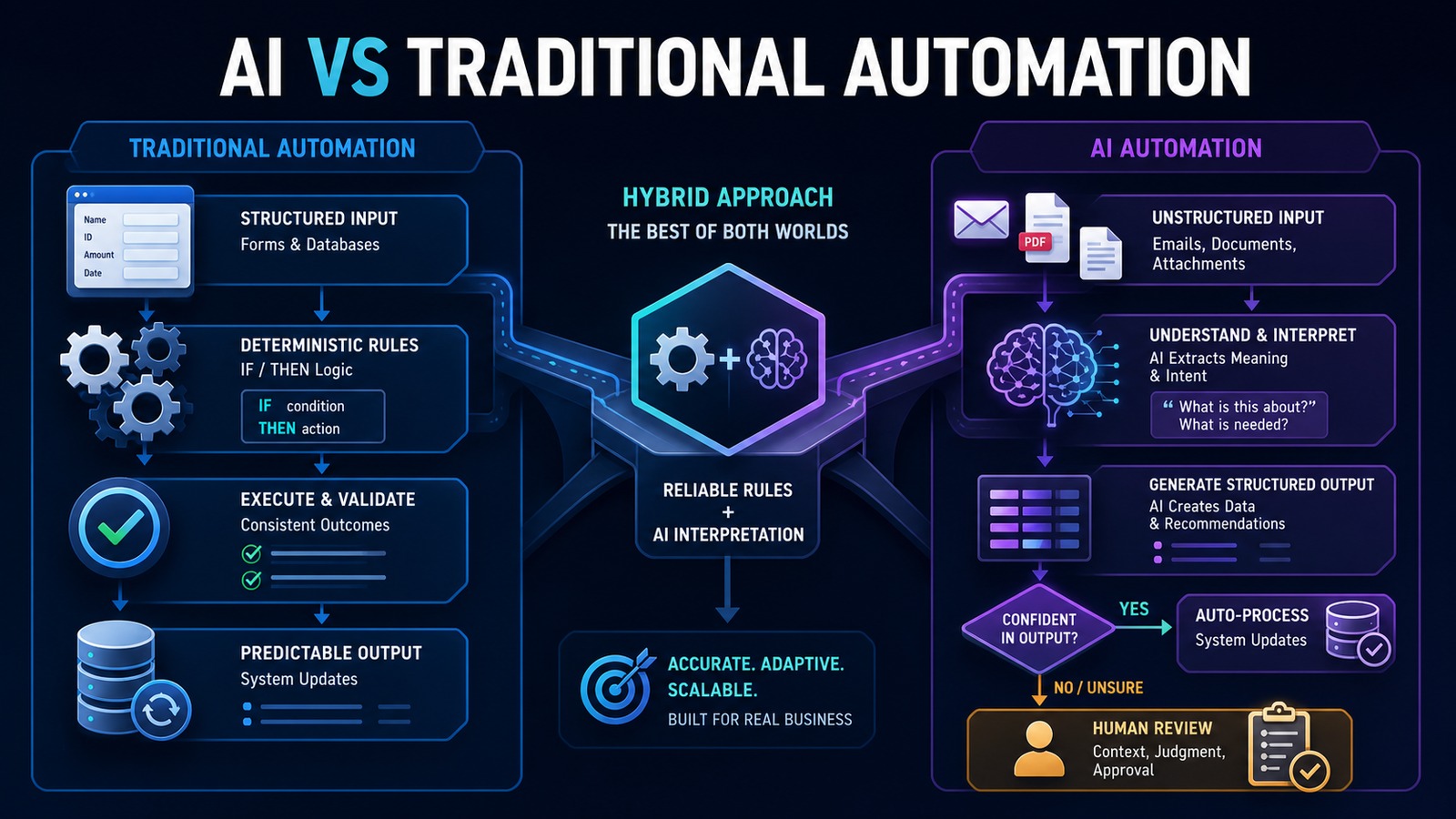
AI vs Traditional Automation: Which Is Right for Your Business?

Comparison of traditional rule-based automation and AI automation with a hybrid approach and human review
Traditional automation provides predictable execution while AI interprets unstructured information; hybrid systems combine both.

AI automation and traditional automation solve different problems. Traditional automation follows explicit rules and produces predictable outcomes. AI automation interprets language, documents, and context when the input does not fit a rigid template. The right business decision is rarely to replace one with the other. It is to use each where its strengths matter.

For a small business, this distinction prevents two expensive mistakes: adding AI to a process that simple rules could handle more reliably, or forcing a growing collection of fragile rules to process information that requires interpretation.

Problem: choosing technology before understanding the workflow

Businesses often begin with a tool instead of a process. A new AI product looks impressive, so the team searches for a place to use it. In another company, employees continue adding spreadsheet formulas and if/then branches to a process that now receives dozens of document formats and customer requests.

Both approaches create operational debt. Unnecessary AI increases cost, variability, and review work. Excessive rule-based logic becomes difficult to maintain and still fails when an email, invoice, or customer message arrives in an unexpected format.

The correct starting question is: How predictable are the inputs, decisions, and required outputs?

Why it matters

Automation touches customer records, financial data, communications, and daily work. A poor technology choice can scale errors as quickly as it scales productivity. Traditional automation commonly fails when an input does not match the expected structure. AI may produce a plausible but incorrect interpretation unless the surrounding system validates it.

The choice affects implementation cost, maintenance, auditability, speed, and risk. When every outcome must be explainable and repeatable, deterministic rules are usually the foundation. When employees spend time reading and interpreting variable information, AI can remove the bottleneck—but only with boundaries and oversight.

Traditional automation: deterministic execution

Traditional automation follows predefined logic. The same valid input produces the same result. Examples include:

  • When a website form is submitted, create a lead in the CRM.
  • When an invoice becomes overdue, send a reminder.
  • When inventory falls below a threshold, notify purchasing.
  • Every Friday, generate a report from the database.
  • When a manager approves a request, move it to the next stage.

This approach is fast, inexpensive, and easy to test when the process is stable. Its weakness appears when the number of exceptions grows. A workflow cannot interpret the intent of a free-form email unless someone creates rules for every likely phrase, format, and combination.

AI automation: interpretation inside a workflow

AI automation adds capabilities such as classification, extraction, summarization, drafting, and context-sensitive recommendations. It can determine whether a message is a lead or support request, extract fields from differently formatted documents, summarize a long conversation, or prepare a response based on approved knowledge.

AI outputs are probabilistic. They must be treated as proposed data rather than unquestioned facts. Production systems should require structured output, validate it against business rules, check confidence or risk, and route uncertain or consequential cases to a person.

Key differences

Decision factor Traditional automation AI automation
Best input Structured forms and database fields Emails, documents, images, and natural language
Behavior Deterministic Probabilistic and context-sensitive
Accuracy Highly predictable when rules match Requires validation and monitoring
Exceptions Each exception needs explicit logic Can interpret variation within defined limits
Auditability Rules are directly traceable Needs source capture, reasoning context, and evaluation
Cost Usually lower per execution Includes model usage and additional governance
Maintenance Update rules when the process changes Version prompts, models, evaluations, and policies

Solution: use a hybrid architecture

The strongest business systems use traditional automation as the control layer and AI as a bounded interpretation service. Rules determine when a workflow starts, what data may be used, which actions are permitted, and whether approval is required. AI converts unstructured information into validated, structured data or a draft recommendation.

This design keeps critical authority outside the model. The AI can suggest that an email is an urgent sales opportunity. A rule can verify required fields, check for an existing customer, apply the assignment policy, and require human approval when the opportunity exceeds a threshold.

Architecture

Form / Email / Document / System Event ↓ n8n workflow trigger ↓ Deterministic validation rules ↙ ↘ Structured input Unstructured input ↓ ↓ Rule-based logic AI interpretation ↘ ↙ Validated structured data ↓ Policy, confidence and risk check ↙ ↘ Automatic action Human approval ↘ ↙ vTiger / Email / Database / Accounting ↓ Audit log and performance metrics

Example: processing incoming invoices

Traditional automation can monitor an inbox, save attachments, check whether a vendor exists, match a purchase order, calculate due dates, and route an invoice for approval. Those are predictable operations.

AI becomes useful when invoices arrive in different layouts or when descriptions are inconsistent. It can extract vendor, invoice number, date, line items, totals, and payment terms into a standard schema. It may also flag unusual descriptions for review.

Invoice email ↓ n8n saves the attachment ↓ AI extracts fields into JSON ↓ Rules validate totals, required fields and duplicates ↓ Purchase-order and vendor checks ↓ Low-risk match → approval workflow Uncertain result → human review ↓ Accounting system update and audit record

The AI does not authorize payment. It reduces the manual effort required to prepare accurate information for the deterministic approval process.

Technology stack

  • n8n: triggers, rule execution, orchestration, approvals, retries, and notifications.
  • OpenAI: document and language interpretation, structured extraction, classification, and drafting.
  • vTiger: customer, lead, opportunity, and activity records.
  • PostgreSQL: workflow state, idempotency, audit events, and metrics.
  • Python: specialized validation, document preprocessing, and internal APIs.
  • Docker: repeatable deployment and isolation of services.

Implementation

1. Map the process

Record the trigger, inputs, decisions, applications, outputs, exceptions, approvals, and current handling time. Remove unnecessary steps before automating them.

2. Separate rules from interpretation

Mark every step as deterministic or interpretive. Calculations, thresholds, identifiers, and permissions normally belong in code or workflow rules. Classification, extraction, and drafting may benefit from AI.

3. Define the data contract

Require AI results to follow a schema with named fields, allowed values, and required evidence. Reject malformed responses rather than attempting to use them.

4. Build the rule-based backbone

Create the trigger, authentication, validation, duplicate protection, system updates, logging, retries, and notifications before adding AI.

5. Add AI at the narrowest useful point

Give the model only the data required for one task. Do not allow broad system access when a focused extraction or classification call is enough.

6. Add risk-based review

Define which actions may run automatically and which require approval. Consider financial value, data sensitivity, confidence, reversibility, and customer impact.

7. Test both failure styles

Traditional steps should be tested with missing fields, API failures, duplicates, and changed formats. AI steps should be tested with ambiguous, conflicting, irrelevant, and adversarial content.

8. Measure the outcome

Track time saved, corrections, exceptions, processing time, model cost, approval rate, and customer impact. Expand only when the results justify additional complexity.

Benefits

  • Time savings: rules execute routine steps while AI reduces manual reading and data entry.
  • Money savings: the business uses AI only where interpretation creates measurable value.
  • Error reduction: deterministic validation catches missing, malformed, or duplicate data.
  • Customer experience: faster intake and more consistent follow-up.
  • Maintainability: clear boundaries make workflows easier to test and improve.

Which approach should your business choose?

Choose traditional automation when inputs are structured, the process is stable, and repeatability is essential. Choose AI automation when employees must interpret variable language or documents and the result can be validated. Choose a hybrid system when an end-to-end process includes both conditions—which is true for most valuable business workflows.

A simple decision rule is: automate facts with rules and interpret ambiguity with AI. Keep authority, validation, and high-impact decisions in the governed workflow.

Read also

Build reliability first

AI expands the range of information a business can automate, but traditional workflow design still provides the reliability required for production. Start with the business process, use deterministic logic wherever possible, add AI only for bounded interpretation, and require human judgment when the risk demands it.

Need help implementing this?

Contact Jupabequi for a free consultation.