AI vs Traditional Automation: Which Is Right for Your Business?
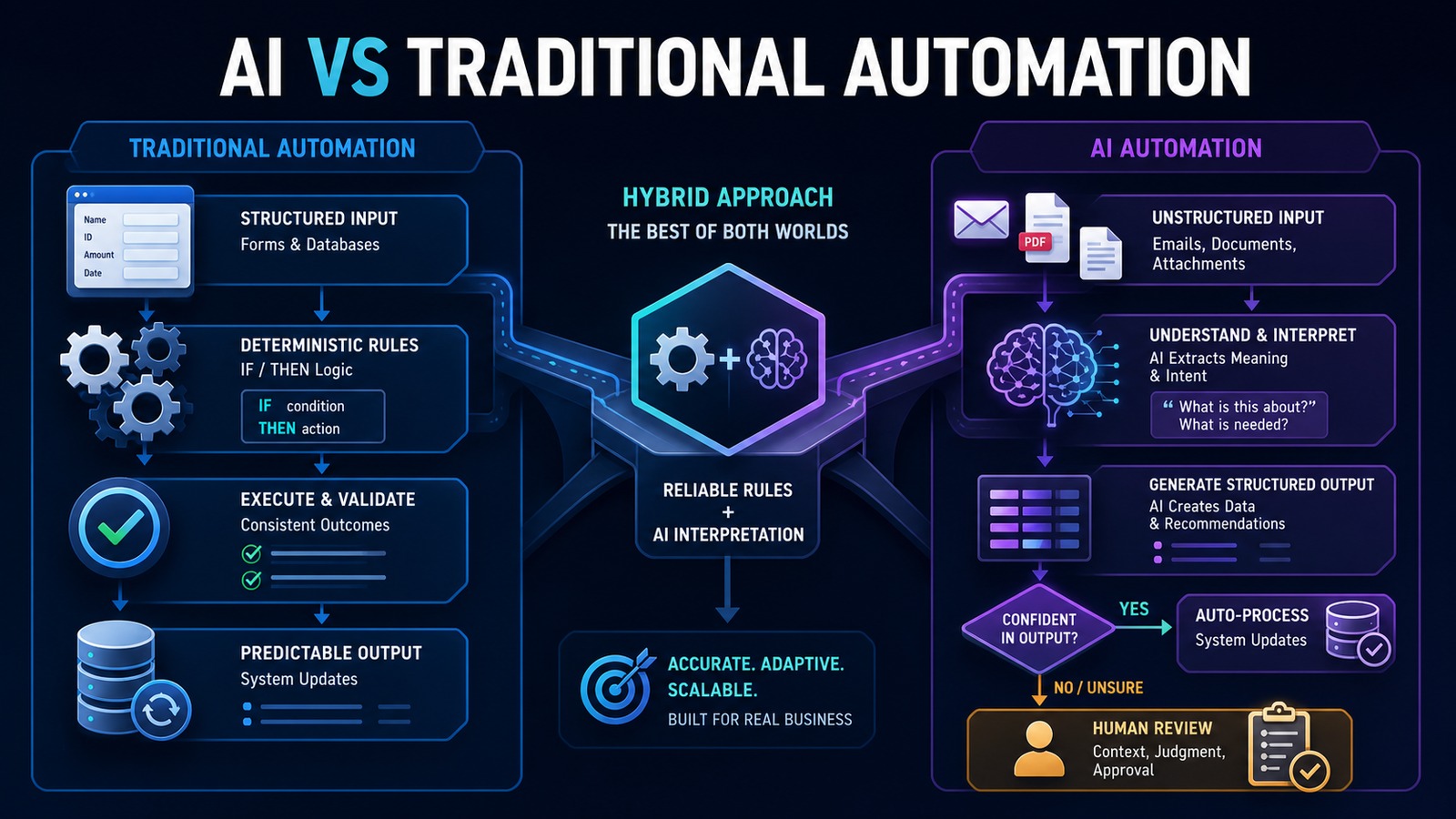
AI automation and traditional automation solve different problems. Traditional automation follows explicit rules and produces predictable outcomes. AI automation interprets language, documents, and context when the input does not fit a rigid template. The right business decision is rarely to replace one with the other. It is to use each where its strengths matter.
For a small business, this distinction prevents two expensive mistakes: adding AI to a process that simple rules could handle more reliably, or forcing a growing collection of fragile rules to process information that requires interpretation.
Problem: choosing technology before understanding the workflow
Businesses often begin with a tool instead of a process. A new AI product looks impressive, so the team searches for a place to use it. In another company, employees continue adding spreadsheet formulas and if/then branches to a process that now receives dozens of document formats and customer requests.
Both approaches create operational debt. Unnecessary AI increases cost, variability, and review work. Excessive rule-based logic becomes difficult to maintain and still fails when an email, invoice, or customer message arrives in an unexpected format.
The correct starting question is: How predictable are the inputs, decisions, and required outputs?
Why it matters
Automation touches customer records, financial data, communications, and daily work. A poor technology choice can scale errors as quickly as it scales productivity. Traditional automation commonly fails when an input does not match the expected structure. AI may produce a plausible but incorrect interpretation unless the surrounding system validates it.
The choice affects implementation cost, maintenance, auditability, speed, and risk. When every outcome must be explainable and repeatable, deterministic rules are usually the foundation. When employees spend time reading and interpreting variable information, AI can remove the bottleneck—but only with boundaries and oversight.
Traditional automation: deterministic execution
Traditional automation follows predefined logic. The same valid input produces the same result. Examples include:
- When a website form is submitted, create a lead in the CRM.
- When an invoice becomes overdue, send a reminder.
- When inventory falls below a threshold, notify purchasing.
- Every Friday, generate a report from the database.
- When a manager approves a request, move it to the next stage.
This approach is fast, inexpensive, and easy to test when the process is stable. Its weakness appears when the number of exceptions grows. A workflow cannot interpret the intent of a free-form email unless someone creates rules for every likely phrase, format, and combination.
AI automation: interpretation inside a workflow
AI automation adds capabilities such as classification, extraction, summarization, drafting, and context-sensitive recommendations. It can determine whether a message is a lead or support request, extract fields from differently formatted documents, summarize a long conversation, or prepare a response based on approved knowledge.
AI outputs are probabilistic. They must be treated as proposed data rather than unquestioned facts. Production systems should require structured output, validate it against business rules, check confidence or risk, and route uncertain or consequential cases to a person.
Key differences
| Decision factor | Traditional automation | AI automation |
|---|---|---|
| Best input | Structured forms and database fields | Emails, documents, images, and natural language |
| Behavior | Deterministic | Probabilistic and context-sensitive |
| Accuracy | Highly predictable when rules match | Requires validation and monitoring |
| Exceptions | Each exception needs explicit logic | Can interpret variation within defined limits |
| Auditability | Rules are directly traceable | Needs source capture, reasoning context, and evaluation |
| Cost | Usually lower per execution | Includes model usage and additional governance |
| Maintenance | Update rules when the process changes | Version prompts, models, evaluations, and policies |
Solution: use a hybrid architecture
The strongest business systems use traditional automation as the control layer and AI as a bounded interpretation service. Rules determine when a workflow starts, what data may be used, which actions are permitted, and whether approval is required. AI converts unstructured information into validated, structured data or a draft recommendation.
This design keeps critical authority outside the model. The AI can suggest that an email is an urgent sales opportunity. A rule can verify required fields, check for an existing customer, apply the assignment policy, and require human approval when the opportunity exceeds a threshold.
Architecture
Form / Email / Document / System Event ↓ n8n workflow trigger ↓ Deterministic validation rules ↙ ↘ Structured input Unstructured input ↓ ↓ Rule-based logic AI interpretation ↘ ↙ Validated structured data ↓ Policy, confidence and risk check ↙ ↘ Automatic action Human approval ↘ ↙ vTiger / Email / Database / Accounting ↓ Audit log and performance metrics
Example: processing incoming invoices
Traditional automation can monitor an inbox, save attachments, check whether a vendor exists, match a purchase order, calculate due dates, and route an invoice for approval. Those are predictable operations.
AI becomes useful when invoices arrive in different layouts or when descriptions are inconsistent. It can extract vendor, invoice number, date, line items, totals, and payment terms into a standard schema. It may also flag unusual descriptions for review.
Invoice email ↓ n8n saves the attachment ↓ AI extracts fields into JSON ↓ Rules validate totals, required fields and duplicates ↓ Purchase-order and vendor checks ↓ Low-risk match → approval workflow Uncertain result → human review ↓ Accounting system update and audit record
The AI does not authorize payment. It reduces the manual effort required to prepare accurate information for the deterministic approval process.
Technology stack
- n8n: triggers, rule execution, orchestration, approvals, retries, and notifications.
- OpenAI: document and language interpretation, structured extraction, classification, and drafting.
- vTiger: customer, lead, opportunity, and activity records.
- PostgreSQL: workflow state, idempotency, audit events, and metrics.
- Python: specialized validation, document preprocessing, and internal APIs.
- Docker: repeatable deployment and isolation of services.
Implementation
1. Map the process
Record the trigger, inputs, decisions, applications, outputs, exceptions, approvals, and current handling time. Remove unnecessary steps before automating them.
2. Separate rules from interpretation
Mark every step as deterministic or interpretive. Calculations, thresholds, identifiers, and permissions normally belong in code or workflow rules. Classification, extraction, and drafting may benefit from AI.
3. Define the data contract
Require AI results to follow a schema with named fields, allowed values, and required evidence. Reject malformed responses rather than attempting to use them.
4. Build the rule-based backbone
Create the trigger, authentication, validation, duplicate protection, system updates, logging, retries, and notifications before adding AI.
5. Add AI at the narrowest useful point
Give the model only the data required for one task. Do not allow broad system access when a focused extraction or classification call is enough.
6. Add risk-based review
Define which actions may run automatically and which require approval. Consider financial value, data sensitivity, confidence, reversibility, and customer impact.
7. Test both failure styles
Traditional steps should be tested with missing fields, API failures, duplicates, and changed formats. AI steps should be tested with ambiguous, conflicting, irrelevant, and adversarial content.
8. Measure the outcome
Track time saved, corrections, exceptions, processing time, model cost, approval rate, and customer impact. Expand only when the results justify additional complexity.
Benefits
- Time savings: rules execute routine steps while AI reduces manual reading and data entry.
- Money savings: the business uses AI only where interpretation creates measurable value.
- Error reduction: deterministic validation catches missing, malformed, or duplicate data.
- Customer experience: faster intake and more consistent follow-up.
- Maintainability: clear boundaries make workflows easier to test and improve.
Which approach should your business choose?
Choose traditional automation when inputs are structured, the process is stable, and repeatability is essential. Choose AI automation when employees must interpret variable language or documents and the result can be validated. Choose a hybrid system when an end-to-end process includes both conditions—which is true for most valuable business workflows.
A simple decision rule is: automate facts with rules and interpret ambiguity with AI. Keep authority, validation, and high-impact decisions in the governed workflow.
Read also
- The Complete Guide to AI Automation for Small Businesses
- What Is an AI Agent?
- Business Automation articles
Build reliability first
AI expands the range of information a business can automate, but traditional workflow design still provides the reliability required for production. Start with the business process, use deterministic logic wherever possible, add AI only for bounded interpretation, and require human judgment when the risk demands it.
Need help implementing this?