Automating Email with n8n: A Reliable Human-in-the-Loop Workflow
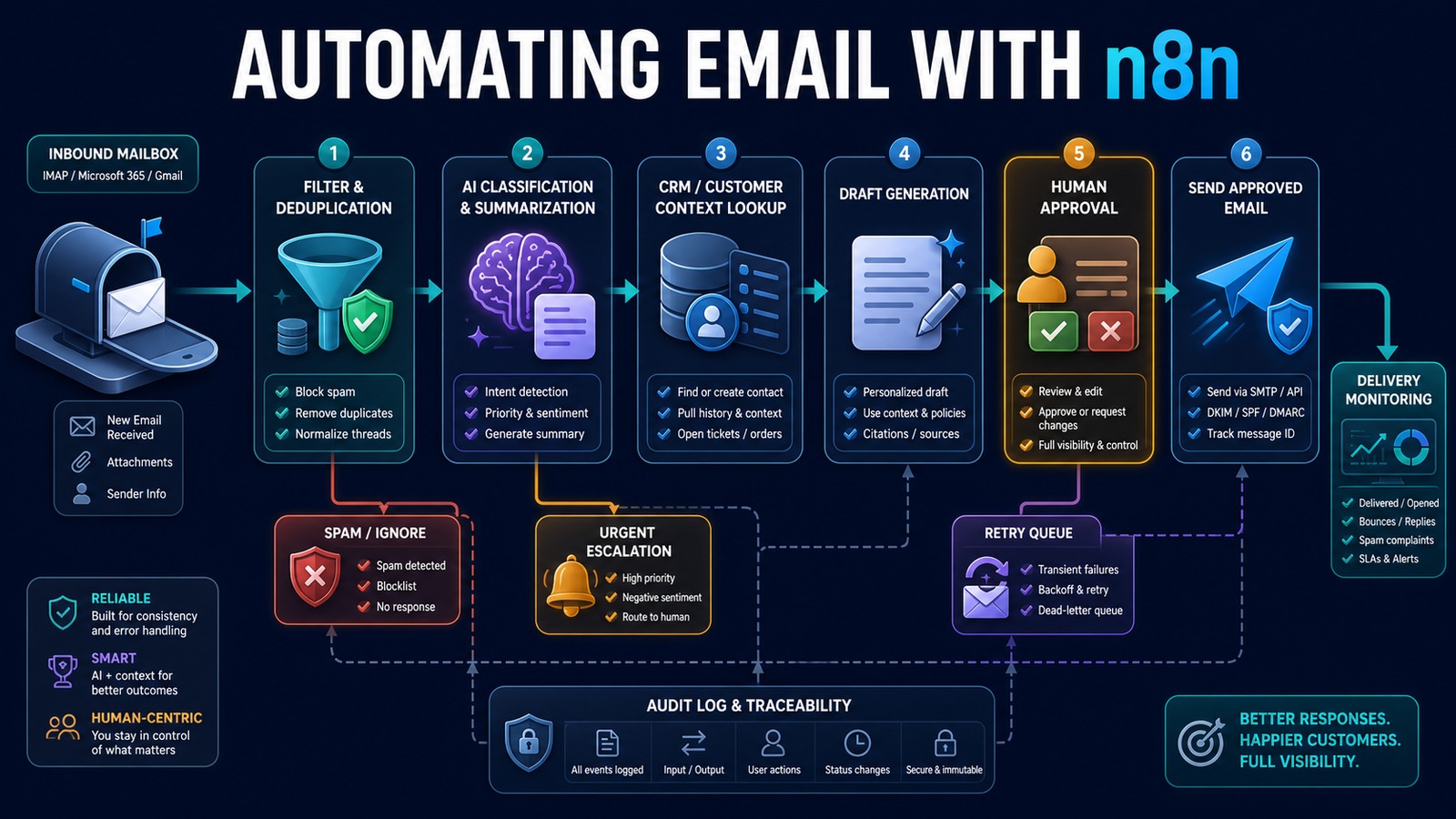
Email is one of the best places to demonstrate practical automation because it connects customers, sales, support, vendors, and internal operations. It is also easy to automate badly. A workflow that sends duplicates, answers the wrong person, exposes private information, or damages deliverability can create more work than it saves.
n8n provides a visual orchestration layer for receiving messages, applying rules, using AI where interpretation helps, retrieving CRM context, requesting approval, sending through an authorized mailbox, and recording the result. The goal is not “AI answers every email.†The goal is faster, more consistent handling with clear control over what may be sent automatically.
Problem: shared inboxes hide operational work
Incoming messages often wait for someone to read, classify, assign, research, and answer them. Employees repeatedly copy contact details into a CRM, search earlier conversations, prepare similar responses, and notify coworkers. Urgent messages can be buried while routine questions consume attention.
Simple autoresponders acknowledge receipt but do not understand intent or connect the message to a business process. Unrestricted AI auto-replies introduce a different risk: plausible but inaccurate commitments can be sent without review.
Why it matters
Response time shapes customer trust and lead conversion. Consistency matters too: two customers should not receive contradictory instructions because different employees used different templates. A well-designed workflow reduces handling time, preserves a complete history, and makes urgent or unusual cases visible.
Email automation must also protect sender reputation. Authentication, reasonable sending volume, suppression rules, accurate reply threading, and failure monitoring are operational requirements—not optional polishing.
Solution: automate preparation before autonomy
Start by automating intake, classification, CRM lookup, and draft preparation. Keep a person in the approval loop for outbound replies until testing demonstrates that a narrow category is safe for automatic handling.
AI is useful for intent classification, summarization, extraction, and drafting. Deterministic n8n steps should control allowed senders, monitored folders, duplicate protection, CRM writes, approval requirements, recipients, sending limits, and retries.
Architecture
Gmail / Outlook / IMAP mailbox
              ↓
       n8n email trigger
              ↓
 Filter folders, senders and auto-generated mail
              ↓
 Normalize content and calculate message ID
              ↓
 Duplicate check and thread lookup
              ↓
 AI intent, urgency, summary and structured fields
              ↓
 vTiger customer and conversation context
              ↓
 Draft reply and recommended action
       ↙               ↓               ↘
 Ignore/spam       Human approval     Urgent escalation
                         ↓
              Gmail / SMTP send
                         ↓
        CRM update, audit log and metrics
                         ↓
             Retry queue and alerts
Example: sales and support inbox
A shared mailbox receives a pricing question from an existing customer. n8n captures the message, removes quoted history for analysis, checks the message ID, and searches vTiger using the sender address. AI classifies the intent as sales, extracts the requested service, summarizes relevant history, and prepares a draft grounded in an approved service description.
New customer email
       ↓
Message and duplicate validation
       ↓
AI returns JSON: intent, urgency, summary, requested service
       ↓
vTiger lookup returns customer and account owner
       ↓
AI prepares a concise draft using approved context
       ↓
Account owner approves or edits
       ↓
n8n sends the threaded response
       ↓
CRM activity and workflow outcome are recorded
A complaint, legal request, payment change, unsubscribe, or low-confidence classification bypasses routine drafting and is escalated. The workflow never invents prices, discounts, availability, or policy.
Technology stack
- n8n: email triggers, branching, waits, approvals, retries, and integrations.
- Gmail, Microsoft 365, IMAP, or SMTP: authorized message intake and delivery.
- OpenAI: structured classification, summarization, extraction, and reply drafting.
- vTiger: contacts, opportunities, owners, and interaction history.
- PostgreSQL: idempotency keys, workflow state, audit events, and metrics.
- Docker: repeatable n8n and database deployment.
Implementation
1. Choose one mailbox and outcome
Define which folder or label is monitored and what success means: classification, assignment, CRM update, draft preparation, or approved sending. Avoid automating an entire inbox at once.
2. Configure credentials securely
Use OAuth where available or provider-approved application credentials. Store them in n8n’s credential system, restrict permissions, and never embed passwords or API keys in workflow nodes.
3. Build filtered intake
Exclude outgoing mail, automated notifications, spam, and unsupported attachments. Preserve sender, recipients, subject, message ID, thread identifiers, timestamps, text, and attachment metadata.
4. Add duplicate protection
Store the provider message ID before consequential actions. If the trigger or workflow retries, it should resume safely without sending another response or creating another CRM record.
5. Define structured AI output
Require a schema containing intent, urgency, summary, extracted fields, confidence, escalation reason, and proposed action. Reject missing or unexpected values.
6. Retrieve approved context
Look up the contact, account owner, open opportunities, and relevant knowledge. Limit the data passed to AI and avoid including unrelated customer information.
7. Create an approval gate
Show the original message, relevant CRM context, proposed reply, and action buttons. Record the reviewer, edits, decision, and timestamp.
8. Send with deliverability controls
Preserve reply headers, use an authenticated domain, honor suppression and unsubscribe requirements, apply volume limits, and separate transactional messages from unsolicited marketing.
9. Handle failures
Use bounded retries for temporary API errors. Route permanent failures, rejected drafts, unsupported attachments, and expired credentials to a visible queue with alerts.
10. Measure and expand
Track time to first review, time to response, approval rate, edit rate, classification accuracy, duplicate prevention, delivery failures, and customer outcomes. Add automatic sending only for narrow, low-risk cases that consistently pass evaluation.
Benefits
- Time savings: less reading, routing, searching, copying, and drafting.
- Money savings: greater inbox capacity without proportional administrative effort.
- Error reduction: structured fields, duplicate checks, and approval records.
- Customer experience: faster, more consistent, context-aware responses.
- Visibility: clear queues, ownership, failures, and performance metrics.
Common mistakes
- Allowing AI to send every generated reply immediately.
- Skipping duplicate and thread protection.
- Passing entire mailboxes or CRM histories when only a few fields are needed.
- Ignoring SPF, DKIM, DMARC, sending limits, and suppression requirements.
- Building no path for expired credentials, rate limits, or rejected drafts.
- Measuring messages sent instead of successful customer outcomes.
Read also
- The Complete Guide to AI Automation for Small Businesses
- Practical AI for Small Businesses
- AI vs Traditional Automation
Reference workflow
n8n publishes a community template demonstrating an AI and IMAP email-response workflow with human approval. Treat templates as starting points: review credentials, permissions, data handling, error paths, and business rules before production use.
Automate the workflow, preserve responsibility
Email automation creates the most value when it prepares accurate work, moves it to the right owner, and makes approval fast. Use n8n to enforce the process, AI to interpret and draft, and people to retain judgment where customer, financial, legal, or reputational risk exists.
Need help implementing this?