CRM Automation Best Practices: Build Reliable Customer Workflows
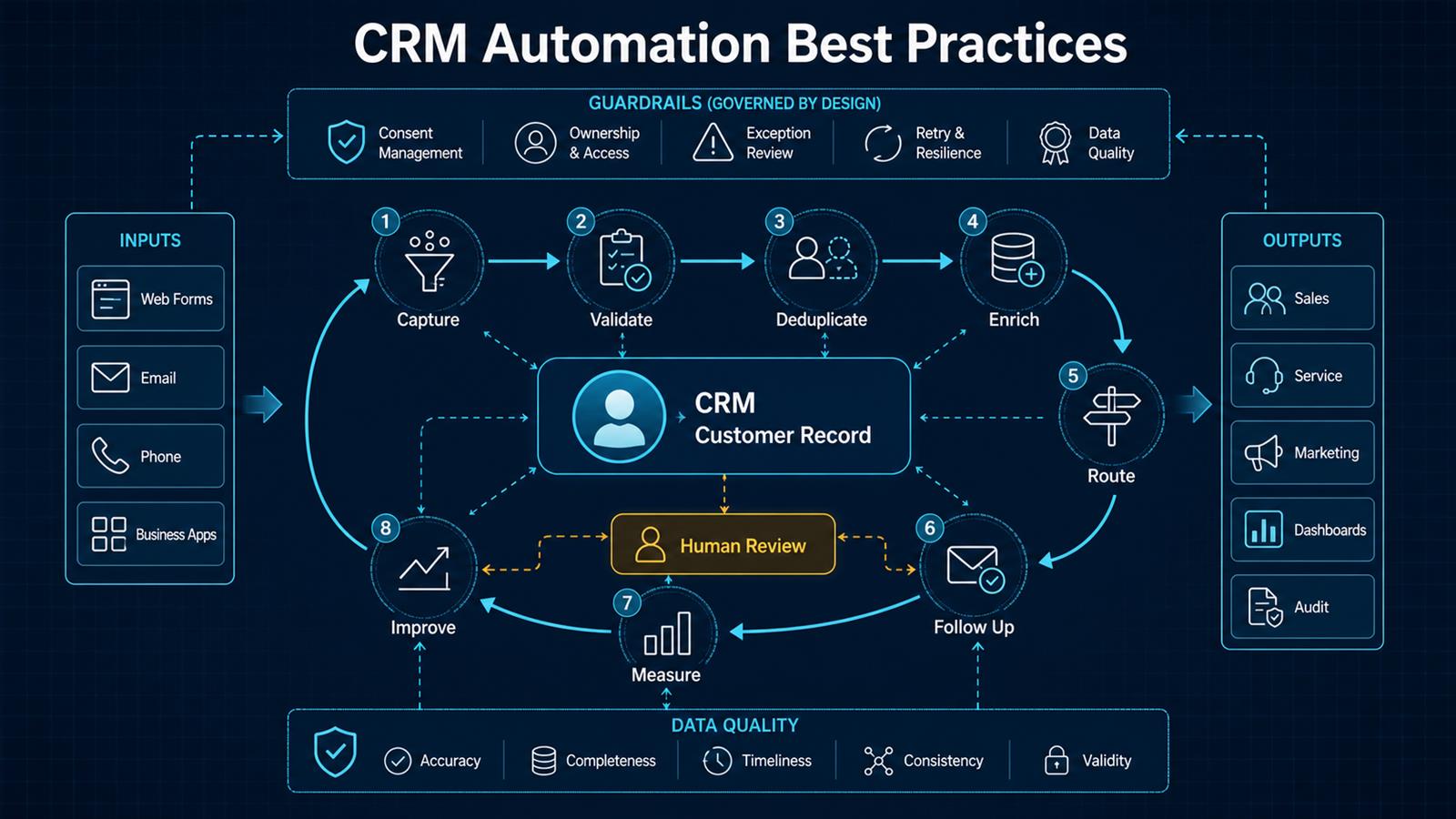
CRM automation should help people act on better customer information at the right time. It should not create a maze of triggers that nobody owns. The most successful systems start with a defined customer journey, make data quality a first-class requirement, and automate repetitive decisions while preserving human judgment for exceptions and important relationships.
Problem
Customer data enters through web forms, email, phone calls, spreadsheets, advertising platforms, support tools, and business applications. Without a consistent process, leads are assigned late, follow-ups are missed, duplicate records multiply, lifecycle stages mean different things to different teams, and reports cannot be trusted.
Many organizations respond by adding more automations. That can make the problem worse. A workflow built on incomplete data may send the wrong message, overwrite a record, assign work to the wrong person, or repeatedly trigger itself. Automation magnifies the quality of the process it is given.
Why it matters
The CRM is often the shared memory of sales, marketing, and service. Its accuracy affects response time, pipeline forecasts, customer experience, workload distribution, and management decisions. When users stop trusting it, they create private spreadsheets and inbox-based processes, making the official system even less complete.
Good automation reverses that cycle. It reduces data entry, makes ownership visible, prompts timely action, and records outcomes. Users receive useful assistance, so they are more likely to maintain the data that makes future automation reliable.
Solution
Design CRM automation as a governed lifecycle: capture, validate, deduplicate, enrich, route, follow up, measure, and improve. Use deterministic rules for identity, required fields, ownership, consent, and lifecycle transitions. Use AI selectively for classification, summarization, suggestions, and unstructured content, with confidence thresholds and human review.
Keep orchestration in a platform such as n8n when the process spans the CRM, email, forms, calendars, and internal systems. Store authoritative customer state in the CRM. This separation makes integrations easier to test, monitor, and change without hiding business logic across multiple applications.
Architecture
Web forms / Email / Phone / Business apps
                    ↓
          Intake and source tracking
                    ↓
 Validate → Normalize → Consent check
                    ↓
       Search, match, and deduplicate
                    ↓
         Enrich approved fields
                    ↓
    CRM customer record and lifecycle state
              ↙             ↘
       Route owner       Create next action
              ↘             ↙
        Sales / Service / Marketing
                    ↓
      Measure outcomes and data quality
                    ↓
        Improve rules and workflows

Exception path: low confidence or policy conflict → Human review
Example workflow
A prospect requests a consultation from the website:
Website form
     ↓
n8n validates required fields and consent
     ↓
Normalize email, phone, company, and source
     ↓
Search vTiger for matching contact or lead
     ↓
Existing? ─ Yes → update permitted fields
     ↓ No
Create lead with source and campaign context
     ↓
Route by territory, service, and availability
     ↓
Create follow-up activity with response deadline
     ↓
Send acknowledgement and notify owner
     ↓
Track response, qualification, and conversion
If the email already belongs to a customer, the workflow should enrich the existing relationship instead of creating a new lead. If routing information is missing or two records are plausible matches, the item goes to a review queue.
Technology Stack
- vTiger CRM: customer records, lifecycle stages, activities, ownership, and reporting.
- n8n: event intake, integration logic, branching, retries, and notifications.
- REST APIs and webhooks: controlled exchange between forms, CRM, email, and business systems.
- PostgreSQL: durable workflow state, mappings, audit metadata, and reconciliation checkpoints where needed.
- Docker: repeatable deployment for an appropriately secured self-hosted environment.
- AI services: optional classification, summaries, intent detection, and suggested actions.
- Monitoring: execution health, exceptions, latency, and business outcome dashboards.
Implementation
1. Start with a measurable business outcome
Choose one outcome such as reducing first-response time, increasing complete lead records, or eliminating unassigned inquiries. Record the current baseline and define the target before building the workflow.
2. Map the customer lifecycle
Define what prospect, lead, qualified lead, opportunity, customer, inactive customer, and other stages mean. Specify the allowed transitions, required evidence, responsible role, and next action for each stage.
3. Establish data ownership
For every important field, decide which system and team owns it. Do not let an external form overwrite verified account data. Record source and last-update time for values that may conflict.
4. Normalize data at intake
Standardize email, telephone, country, state, company, dates, campaign source, and product-interest values. Validate required fields and quarantine malformed submissions before they enter the CRM.
5. Design identity and duplicate rules
Use stable keys and a match hierarchy rather than one fragile field. Exact email may be strong for a person, while an account may require domain, legal name, address, or external customer ID. Ambiguous matches need review, not an automatic merge.
6. Make routing explicit
Route by geography, service, account status, language, workload, and availability. Define a fallback owner, response deadline, escalation path, and reassignment behavior so nothing remains unowned.
7. Automate the next action
Create a task, reminder, acknowledgement, or service activity when a meaningful event occurs. Avoid excessive notifications. Each automation should answer who needs to act, what they need to do, and by when.
8. Apply AI with boundaries
AI can classify an inquiry, summarize a conversation, extract details, or draft a response. Validate structured outputs, use confidence thresholds, protect sensitive data, and require approval for high-impact communications or changes.
9. Build for retries and idempotency
Store a source-event ID so retrying an event does not create another record or activity. Retry transient failures with controlled backoff, separate permanent validation failures, and send actionable exceptions to a review queue.
10. Test with realistic edge cases
Test existing customers, shared email addresses, blank values, international phone numbers, duplicate delivery, inactive owners, expired credentials, API limits, and partial outages. Confirm that bad inputs fail safely.
11. Measure adoption and outcomes
Monitor record completeness, duplicate rate, unassigned records, time to first response, overdue activities, conversion by source, workflow failure rate, and manual-review volume. Technical success without a business outcome is not enough.
12. Review automations regularly
Assign an owner to every workflow. Document its trigger, purpose, dependencies, fields changed, failure path, and retirement criteria. Review automations when products, teams, permissions, policies, or CRM fields change.
Benefits
- Time savings: less manual entry, assignment, follow-up creation, and status chasing.
- Money savings: fewer lost leads, duplicate records, and hours spent repairing data.
- Error reduction: validation and ownership rules create more consistent customer records.
- Customer experience: faster, better-informed responses with fewer repeated questions.
- Management visibility: reliable lifecycle stages and activity data improve reporting.
- Scalability: teams can handle more customer activity without proportionally adding administration.
Common mistakes to avoid
- Automating an undefined process.
- Creating records before checking identity and consent.
- Using AI where a deterministic rule is clearer and safer.
- Allowing blank or low-confidence values to overwrite verified data.
- Building workflows without a fallback owner or exception queue.
- Measuring executions instead of customer and business outcomes.
- Leaving automations undocumented and unowned.
Read also
- The Complete Guide to AI Automation for Small Businesses
- n8n + vTiger Integration
- Practical AI for Small Businesses
- AI vs Traditional Automation
Need help implementing this? Contact Jupabequi for a free consultation.