Invoice Automation Workflow: From Capture to Approval and Audit
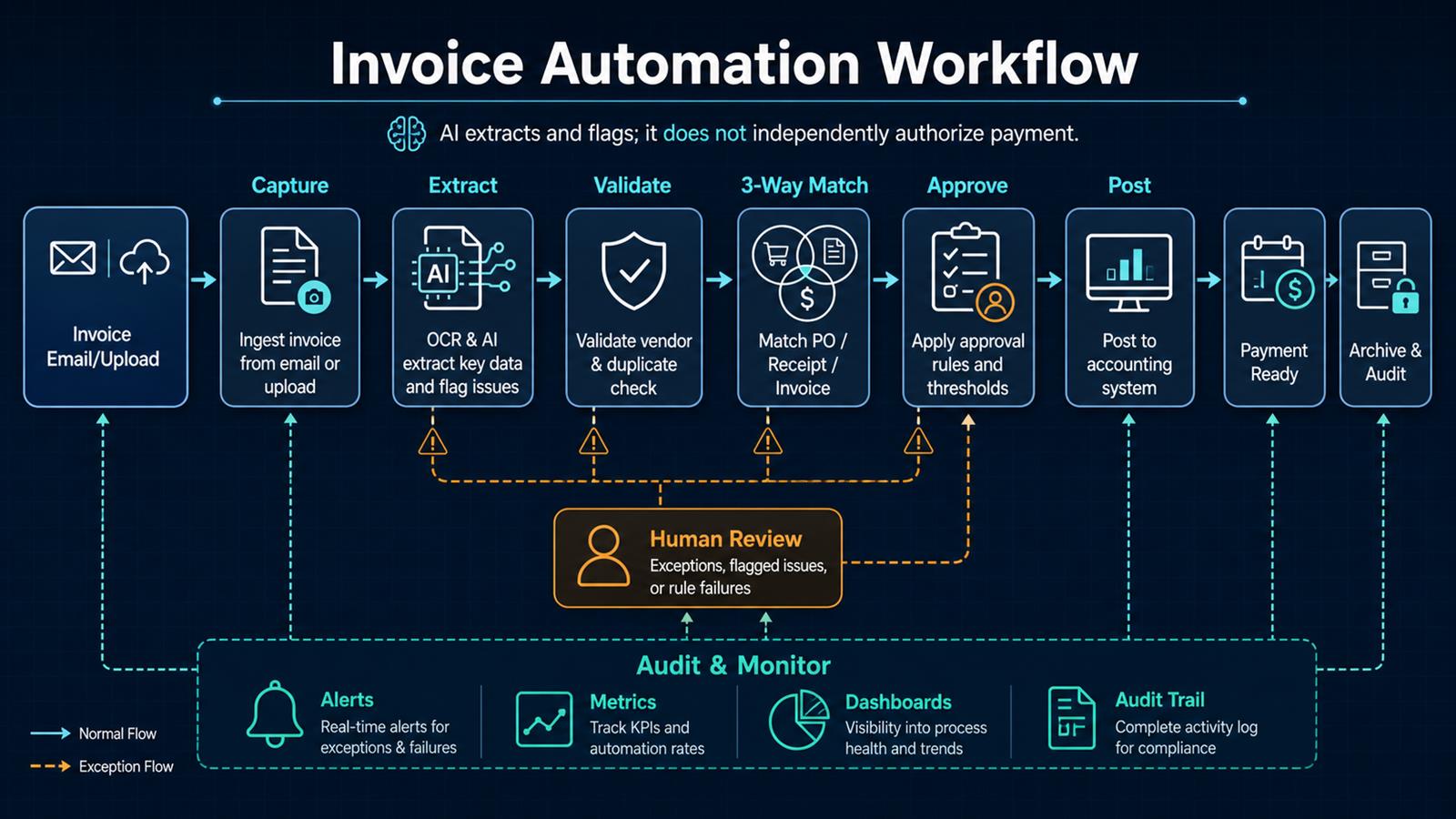
Invoice automation is often described as a faster way to enter bills. That misses the larger opportunity. A good workflow creates a controlled path from invoice receipt to an approved accounting entry: it captures every document, extracts structured data, detects duplicates, checks business rules, matches supporting records, routes exceptions, and preserves an audit trail. The result is not simply less typing. It is a more visible and dependable accounts-payable process.
Problem
Invoices arrive through individual inboxes, shared mailboxes, vendor portals, scans, and file uploads. Finance staff download attachments, rename files, copy fields into an accounting system, search for purchase orders, ask managers for approval, and follow up when information is missing. Status is scattered across email threads and spreadsheets.
This manual process creates predictable risks: the same invoice can be submitted twice, incorrect vendor or bank information can go unnoticed, approvals can stall, early-payment discounts can be missed, and month-end close becomes a hunt for incomplete records. Simply adding OCR does not solve those control problems.
Why it matters
Accounts payable affects cash flow, supplier relationships, financial reporting, and fraud exposure. An invoice paid twice is a direct loss. An invoice posted to the wrong account distorts reporting. A missing approval weakens the audit trail. Slow processing also makes it harder to forecast upcoming cash requirements and answer a vendor asking when payment will occur.
Automation makes the process measurable. Leaders can see cycle time, straight-through processing rate, exception reasons, approval bottlenecks, duplicate flags, and invoices approaching their due dates. Those measurements reveal where policy, vendor data, or purchasing practices need improvement.
Solution
Build a staged workflow in n8n or a similar orchestration platform. Centralize intake, store the original document, extract invoice fields with OCR and AI, and validate the output against vendor records and deterministic rules. When purchase orders are used, compare the invoice with the purchase order and receipt. Route clean invoices according to approval thresholds and send exceptions to a human with the evidence needed to decide.
AI should extract, classify, summarize, and flag uncertainty. It should not independently authorize a payment. Approval policy, separation of duties, vendor-change verification, and accounting controls remain explicit business rules owned by the organization.
Architecture
Invoice email / upload / scan
              ↓
      Central intake and archive
              ↓
       OCR + AI field extraction
              ↓
 Vendor validation + duplicate detection
              ↓
 PO ↔ Receipt ↔ Invoice three-way match
         ↙                 ↘
   Clean invoice         Exception
         ↓                 ↓
 Approval rules       Human review
         ↘                 ↙
        Approved accounting entry
              ↓
       Payment-ready queue
              ↓
    Audit trail + metrics + alerts
Separate each stage so it has one responsibility and a visible outcome. Preserve the original file and extracted values, record confidence and validation results, and attach the final accounting record ID. That lineage makes troubleshooting and audits much easier than one large opaque workflow.
Example workflow
A vendor emails a PDF invoice to a dedicated address:
Vendor email
     ↓
n8n verifies sender and saves attachment
     ↓
OCR/AI extracts vendor, invoice number, date,
currency, PO number, line items, tax, and total
     ↓
Rules validate totals, vendor status, and duplicates
     ↓
System matches purchase order and receipt
     ↓
Within tolerance? ── No → AP exception review
     ↓ Yes
Route by amount, department, and cost center
     ↓
Manager approves
     ↓
Post bill to accounting system
     ↓
Archive evidence and notify AP
If the amount, quantity, tax, or vendor details do not match, the workflow stops before posting and shows the reviewer exactly which check failed. If the same vendor and invoice number already exist—or the document closely resembles a previously processed invoice—it is held for duplicate review.
Technology Stack
- n8n: email or upload triggers, routing, API integrations, retries, and notifications.
- OCR and document AI: extraction of header fields, line items, totals, and document confidence.
- Accounting or ERP API: vendor master, purchase orders, receipts, bills, and posting status.
- PostgreSQL: checkpoints, idempotency keys, exception states, and audit metadata when required.
- Docker: repeatable deployment for an appropriately secured self-hosted workflow.
- Object storage: controlled retention of original invoices and supporting evidence.
- Email or collaboration tools: approval requests, reminders, and exception alerts.
- Monitoring: workflow health, latency, failure rate, and operational dashboards.
Implementation
1. Measure the current process
Document monthly invoice volume, intake channels, average processing time, approval time, exception rate, duplicate incidents, and cost per invoice. Select a narrow first scope, such as invoices sent to one shared mailbox for one business unit.
2. Centralize intake
Use a dedicated mailbox or secure upload endpoint. Generate a source-event ID, store the original message and attachment, reject unsupported file types, scan files as required by security policy, and prevent the same message from being processed twice.
3. Define the invoice schema
Specify required fields and formats: legal vendor identity, invoice number, dates, currency, purchase-order reference, line descriptions, quantities, unit prices, tax, subtotal, and total. Normalize dates, decimals, currencies, and identifiers before downstream comparisons.
4. Extract data with confidence controls
Run OCR and structured extraction, then retain field-level confidence where available. Use deterministic checks to confirm that line amounts add to the subtotal and that subtotal, tax, and adjustments equal the total. Low-confidence or inconsistent results go to review rather than being guessed.
5. Validate the vendor and detect duplicates
Match the invoice to an approved vendor record. Check combinations such as vendor ID, normalized invoice number, amount, date, purchase order, and document fingerprint. Never accept bank-detail changes solely because they appear on an invoice; verify them through an approved, independent process.
6. Perform two-way or three-way matching
For purchase-order invoices, compare invoice values to the PO and, when receiving data exists, the goods or service receipt. Configure documented tolerances for quantity, unit price, tax, freight, and total. A mismatch should create a specific exception, not a generic failure.
7. Route approvals by policy
Determine approvers using amount, department, cost center, project, vendor, and exception type. Set deadlines, reminders, escalation paths, and delegated-approval rules. Preserve separation of duties: invoice preparation, approval, payment release, and reconciliation should not all belong to one person.
8. Post only approved records
Create the bill in the accounting system only after required checks and approvals succeed. Use idempotent behavior so a retry cannot create a second bill. Store the returned accounting record ID, status, and timestamp with the workflow execution.
9. Design exception and recovery paths
Separate extraction errors, validation failures, policy exceptions, authentication failures, rate limits, and system outages. Retry only transient problems with capped backoff. Give reviewers the original document, extracted fields, related PO and receipt, rule result, and recommended next action.
10. Monitor controls and outcomes
Track intake-to-posting time, approval aging, straight-through rate, exception rate by cause, duplicate flags, retry volume, and posting failures. Reconcile invoices received, approved, posted, paid, and archived so missing transitions become visible.
Benefits
- Time savings: routine capture, validation, matching, routing, and posting happen without repetitive entry.
- Money savings: fewer duplicate payments, fewer corrections, and better visibility into due dates and discounts.
- Error reduction: totals, vendor data, purchase orders, receipts, and policies are checked consistently.
- Customer experience: vendors receive faster answers because invoice status is visible.
- Control: approvals, exceptions, evidence, and system actions create a traceable history.
- Focus: finance staff spend more time resolving meaningful exceptions and less time moving files.
Start with control, then optimize speed
The best first target is not “zero-touch payment.†It is complete intake, reliable extraction, visible exceptions, documented approval, and safe posting. Once those controls are stable, the organization can increase straight-through processing for trusted vendors and low-risk invoice types. Automation should make accountability clearer, not remove it.
Read also
- The Complete Guide to AI Automation for Small Businesses
- n8n + vTiger Integration
- Automating Email with n8n
- AI vs Traditional Automation
Need help implementing this? Contact Jupabequi for a free consultation.