n8n + vTiger Integration: A Reliable CRM Automation Guide
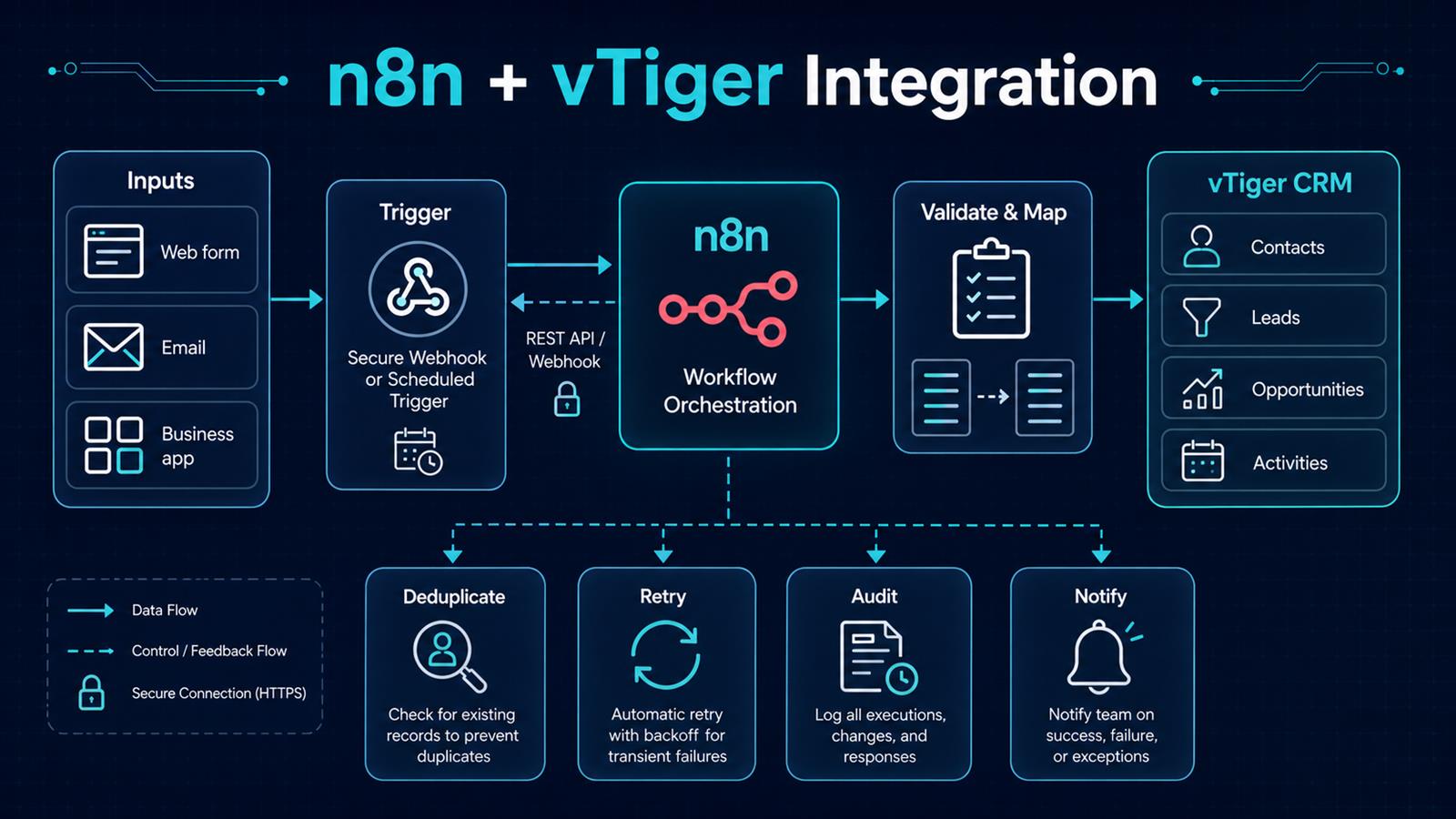
Connecting n8n to vTiger can turn a CRM from a passive database into the operational center of a business. New inquiries can become leads automatically, qualified leads can create opportunities, customer messages can create follow-up activities, and teams can be notified without copying data between systems. The useful part is not merely moving fields. It is building a dependable process that validates data, prevents duplicates, records what happened, and recovers when an API call fails.
Problem
Small businesses often collect customer information through web forms, shared inboxes, spreadsheets, ecommerce systems, and line-of-business applications. Employees then re-enter that information into vTiger. Manual entry delays response times and produces missing fields, duplicate contacts, inconsistent ownership, and opportunities that never receive a follow-up task.
A simplistic integration only replaces typing with an API call. It can still create duplicates, overwrite good information with empty values, expose an unsecured webhook, or silently lose a record during an outage. Reliable CRM automation must account for both the happy path and the exceptions.
Why it matters
CRM data drives sales forecasts, service history, marketing segmentation, and management reporting. If records arrive late or contain inconsistent values, every downstream decision becomes less trustworthy. A well-designed integration shortens lead-response time, gives salespeople complete context, and makes the process measurable. It also reduces the hidden cost of reconciliation: finding duplicate records, checking whether an update succeeded, and reconstructing activity after a failure.
Solution
Use n8n as the orchestration layer between business systems and vTiger. An event enters through an authenticated production webhook when real-time processing is available, or through a Schedule Trigger when polling is more appropriate. n8n validates the payload, translates external fields into a stable internal schema, looks for an existing CRM record, and then creates or updates the appropriate vTiger module through its API.
Operational branches record the result, retry transient failures with controlled backoff, and notify a person only when attention is necessary. For critical processes, combine real-time webhooks with a scheduled reconciliation workflow so a missed event can be detected later.
Architecture
Web form / Email / Business application
                    ↓
       Secure webhook or schedule
                    ↓
              n8n workflow
                    ↓
     Validate → Normalize → Map fields
                    ↓
       Search vTiger for existing record
              ↙             ↘
          Create            Update
              ↘             ↙
     Contact / Lead / Opportunity / Activity
                    ↓
        Audit log → Notify → Reconcile

Failure path: classify error → retry with backoff → alert → manual queue
Keep the integration contract explicit. Define one canonical representation for names, email addresses, phone numbers, dates, source codes, owners, and consent fields. The input system speaks its own language, vTiger speaks another, and the mapping step provides a controlled translation between them.
Example workflow
Consider a consultation request submitted on a website:
Website form
     ↓
Authenticated n8n webhook
     ↓
Validate email, consent, and required fields
     ↓
Normalize phone number and campaign source
     ↓
Search vTiger by normalized email
     ↓
Create or update Contact and Lead
     ↓
Create follow-up Activity for the assigned owner
     ↓
Send acknowledgement and notify sales
     ↓
Write record ID, execution ID, and outcome to audit log
The workflow should return a quick success response to the form when appropriate, while longer CRM and notification work continues in a controlled path. If the same request is delivered twice, an idempotency key or source-event ID prevents a second lead from being created.
Technology Stack
- n8n: triggers, transformation, branching, API calls, retries, and notifications.
- vTiger CRM: contacts, leads, opportunities, activities, ownership, and sales history.
- REST API and webhooks: authenticated exchange between systems.
- Docker: repeatable self-hosted deployment when appropriate.
- PostgreSQL: n8n persistence and, when needed, integration checkpoints or audit data.
- Reverse proxy and TLS: HTTPS termination, access controls, and stable production endpoints.
- Monitoring: execution metrics, failure alerts, and reconciliation reports.
Implementation
1. Define the business event and owner
Start with one concrete event, such as “consultation form submitted,†and define the expected CRM result. Name the person responsible for exceptions. Decide which system owns each field so the automation does not overwrite authoritative information.
2. Choose webhook, polling, or a hybrid
Use a webhook when the source supports reliable real-time delivery. Use scheduled polling when it does not, tracking a durable timestamp or cursor. For high-value processes, add a lower-frequency reconciliation job even when webhooks are the primary trigger.
3. Secure credentials and endpoints
Store secrets in n8n credentials rather than workflow fields. Require HTTPS and authenticate incoming requests with a supported header, token, or signature. Restrict network access where practical, minimize credential permissions, and avoid writing personal data or tokens into routine logs.
4. Build a canonical data model
Create a Set or Code step immediately after intake that produces stable field names and formats. Normalize case, whitespace, telephone numbers, dates, country codes, and source values. Reject or quarantine payloads that fail required validation instead of sending malformed data to the CRM.
5. Authenticate to vTiger and test reads first
Configure the appropriate vTiger API authentication for the deployed edition and version. Test a harmless query before enabling writes. Confirm module names, required fields, field types, ownership rules, pagination, and API limits against the documentation for that specific installation.
6. Add duplicate detection and idempotency
Search using a stable business key such as a normalized email address, customer number, or source-system ID. Store the source event ID with the result when possible. Repeat delivery of the same event should return the existing outcome rather than create another CRM record.
7. Separate create and update rules
Do not treat an update as a complete replacement. Only write fields that the source is allowed to own, and do not replace a populated CRM value with a blank input. Record the vTiger ID returned by a successful create or update for downstream activities and auditability.
8. Design failure handling
Retry temporary network errors, rate limits, and server failures with a capped delay. Do not blindly retry validation or authentication errors. Route unrecoverable items to an exception queue with a safe payload reference, error class, execution ID, and a clear remediation step.
9. Test realistic edge cases
Test duplicates, missing required fields, accented names, unexpected phone formats, expired credentials, vTiger downtime, slow responses, and repeated webhook delivery. Use production webhook URLs only after the n8n workflow is activated, and keep test data clearly separated from real customer records.
10. Monitor and reconcile
Track success rate, latency, retries, failures, duplicate prevention, and records awaiting manual review. A scheduled reconciliation workflow can compare source events with recorded vTiger IDs and surface gaps before users discover them.
Benefits
- Time savings: customer information reaches the CRM without repetitive entry.
- Money savings: staff spend less time reconciling systems and correcting avoidable data issues.
- Error reduction: validation, mapping, and deduplication make records more consistent.
- Customer experience: faster routing and follow-up reduce the delay after an inquiry.
- Visibility: audit records and alerts show whether each event succeeded, retried, or needs attention.
- Scalability: the same pattern can support forms, inboxes, invoicing, support, and other business applications.
Read also
- The Complete Guide to AI Automation for Small Businesses
- Automating Email with n8n
- AI vs Traditional Automation
- Practical AI for Small Businesses
Build the integration around the business process
The strongest n8n and vTiger integrations are intentionally unexciting in production: records arrive once, fields are predictable, errors are visible, and recovery is routine. Begin with a narrow workflow and measurable service level, then reuse the secure intake, canonical mapping, idempotency, retry, and monitoring patterns across other processes.
Need help implementing this? Contact Jupabequi for a free consultation.